
Class Discussions as a mini-LMS

With the COVID-19 (a.k.a. The Coronavirus) affecting so many people everywhere, schools are contemplating temporary closures to help thwart the spread of the virus. Long closures can really be disruptive, and schools are looking for ways to continue providing education for students on the QuickSchools platform while schools are closed. One such way is Online Learning.

Online Learning is typically in the domain of Learning Management Systems (LMS), which has a completely different set of features as compared to a Student Information System (SIS). And we’ve discussed this extensively in previous articles.

Adopting a new LMS can also be challenging, and requires strong commitment for the school. In the long run, adopting an LMS has many benefits, but it also introduces complications to your day-to-day processes. If you do decide on adopting an LMS, we recommend selecting one that readily integrates with QuickSchools. Check out some of of the following systems:

However, if you’re looking for a quick-and-easy temporary solution, just to tide you over, you might want to try using our Class Discussions module. QuickSchools is NOT an LMS, but we are slowly developing some basic LMS features for schools that need something simple to use, without necessarily adopting a whole separate program.

For example, you can post homework assignments, links and videos to a particular class/subject, and students can interact with other members of the class via a chat-like interface.

Teachers can select a class that they’re teaching, and review/post comments from all students. Teachers can also send out an email notification when a thread/topic is created:

Class Discussions for Teachers

Students can review/comment on posts from all subjects in glance. All threads and comments are arranged in chronological order. Each thread is labelled to indicate which subject it’s for:

Read More »
Chinese Language Support

Quickschools has rolled out support for the Chinese language, as we see the number of users who know Chinese continue to grow on our system.

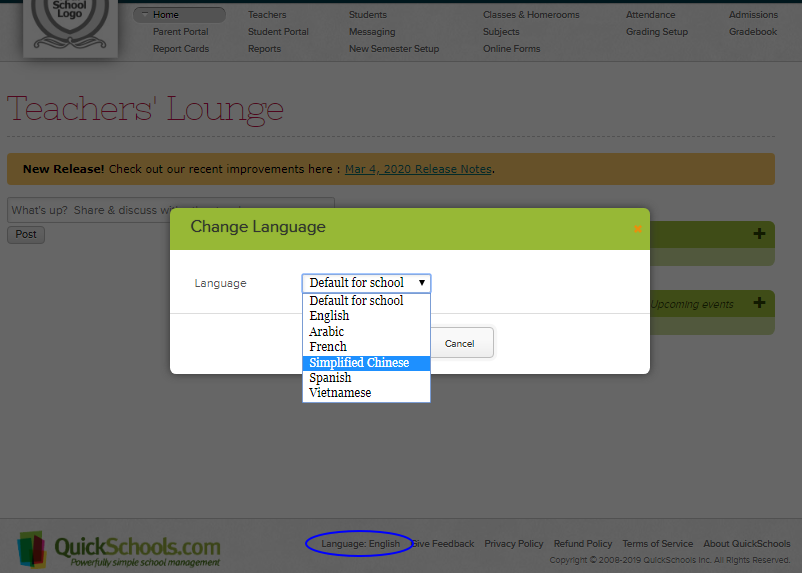
To change your user interface to Chinese: please log in to Quickschools, click Language at the bottom of the page, then select Simplified Chinese in the drop-down:

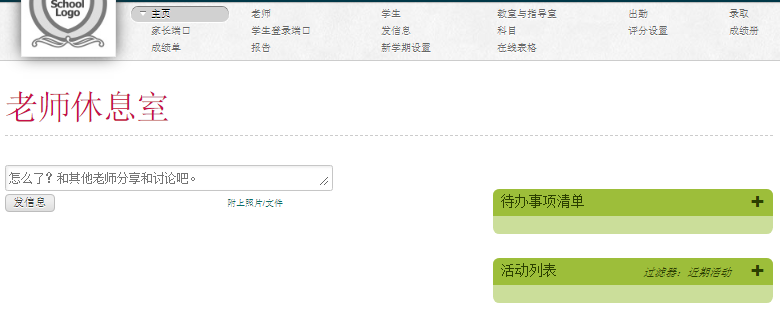
The user interface will then be translated to Chinese:

Let us know your experience! We’d be glad to hear your feedback. 

What language do you want us to support next? Please let us know!

New Release – Mar 4, 2020

As mentioned in our previous release, our primary engineering focus is to address bugs and improve the general experience using QuickSchools. So here are the latest improvements:

Major Improvements

  • Limited release to restore “Print (In Order)” for Report Cards (See below)
  • Report Creator support for calculated fields in Transcripts (See below)
  • Online Payments now supports Canadian Dollar (See below)
  • Expanded API support for iOS and Android Apps

General Bug Fixes / Improvements

  • Improve how Period Names are configured in Scheduling module
  • Fix Email Alert for Fee Tracking module
  • Fix transaction date for Fee Tracking Importer
  • Fix error accessing notifications from a deleted user
  • Fix error displaying Formula Marks in Report Cards when grades are submitted from Gradebook
  • Fix error saving Student record when Sibling feature is disabled
  • Fix error sorting fees from Parent and Student Portals
  • Improve support for displaying only relevant teacher info on Parent and Student Portals
  • Report Creator support for Subject Credits
  • Super User App supports Custom Domain
  • Sign-Up Page now includes a new field for School Type
  • Miscellaneous improvements for QuickBooks Integration

Report Card Print (In Order)

The report card “Print (In Order)” function has been disabled for quite some time now. We are now rolling out this feature in a limited capacity. If you’d like to use this feature, please submit a request to our support team, and we’ll enable:

report card print
Report Card “Print (In Order” function

We’ll be doing some additional testing to make sure this feature works well, after which we’ll be releasing this feature to all schools. 

Reporting on Custom Transcripts

The Report Creator can now report of fields that have been configured on your Transcripts template. This is particularly useful for schools that have a custom template with custom calculations:

Read More »

Online Form Reports

Quickschools is now including several new Summary Reports for the Online Forms app:

  • Missing Online Forms
  • Online Form Submissions
  • Paid Online Form Submissions

Please note, you can still generate your own custom reports using the Report Creator app.

The Online Form app is often used for online student re-registration. During this process, administrators need visibility into students who have NOT submitted the re-registration forms, so they can follow up with students and/or parents before the due date. Administrators can also use the report to track existing entries, including students who have started but have not submitted their forms. The reports below provide these information:

  • Missing Online Forms – lists students who haven’t submitted the forms for a particular Form Packet.
  • Online Form Submissions – lists the students who have started and/or submitted forms for a particular Form Packet

The Online Forms app also allows schools to collect fees on submission, and the Paid Online Form Submissions report lists payment information for each submission.

To enable these reports, just go to MY APPS and click Configure in the Online Forms app. Enter the role or user who can access the reports.

Once enabled, users can go to the Reports tab to run the Online Form reports.

New Release – Feb 11, 2020

As mentioned in our previous release, our primary engineering focus is to address bugs and improve the general experience using QuickSchools. So here are the latest improvements:

Major Improvements

  • Reminder to Activate Academic Term
  • Blank Screen / Clear Cache Issue
  • Customizable Auto-Logoff Feature by School
  • Expanded API support for iOS and Android Apps

General Bug Fixes / Improvements

  • Fix error logging in when multiple academic terms are activated at the same time
  • Fix Attendance Indicator for Subject Attendance
  • Fix NULL that appears in Recipient Lists
  • Fix “Check In” filter for Library App in Report Creator
  • Fix “Date” filter for Gradebook module in Report Creator
  • Fix Table Preferences for Report Cards Criteria List
  • Fix To Do list support on Firefox
  • Fix disappearing access to Attendance for Homeroom Teachers
  • Bug fix when migrating Attendance Settings with Master Scheduler enabled
  • Bug fix for checking out books across multiple sites (in Library App)
  • Bug fix when deleting custom role still linked to teachers and staff
  • Bug fix when permanently deleting students with admissions application
  • Bug fix when using Admin Columns with Term Grades
  • Disable Attendance on Holidays for Staff users
  • Expanded Transcripts support for custom calculations using credits
  • Expanded App Store support for restricting access to modules
  • Expanded Color Scheme support for links
  • Support for Course Request Importer to exclude deleted students
  • Support for printing period start/end times in Master Scheduler PDF
  • Cosmetic fix to Parent/Siblings tab on Parent and Student Portals

Please note: We recently changed the out-going number for text and voicemails. We will soon be changing this to a 5-digit short code to avoid the Error Code 30007 (Carrier Filtering). We’ll keep you guys updated on this, as improvements are made.

New Release – Jan 22, 2020

For the next several Sprints, QuickSchools will be focusing on bug fixes, performance improvements and UI enhancements.

Here’s a list of our latest release:

  • Improved System-Wide Support for Nick Name (See below)
    • Searching for Students includes Nick Name
    • Searching Report Cards includes Nick Name
    • Searching for Student Portal users includes Nick Name
    • Searching for Parent Portal users includes Student Nick Name
    • Subject Enrollment screens now include Student Nick Name
    • Display Student Nick Name is Super User App
    • Display Student Nick Name in Private Messaging
  • Master Scheduler Improvements
    • Schedule PDF now supports Room Code
    • Bug Fix when Migrating to Next Semester
    • Bug Fix when re-installing Master Scheduler
  • Miscellaneous improvements and bug fixes
    • Improved Load Times for Transcripts (See below)
    • The “Sign-In Sign-Out” app now support Bulk Sign-Out
    • The “Graduation Status Report” PDF now supports credits for currently enrolled courses.
    • Bug Fix when using Private Messaging from Student Portal for subjects with more than one teacher.
    • Bug fix for Attendance Taken check mark for Subject and Period-Based Attendance

Improved System-Wide Support for Nick Name

For English-speaking schools where the student names are not written in the conventional latin character set (i.e. names written in Chinese, Korean, Japanese or Arabic), the Nick Name field becomes an important field for teachers and staff to identify students:

Utilize the Nick Name field when Students’ Name is not in latin character set

In these cases, system generated documents (like report cards and transcripts) will display the student’s name in their native language. But teachers will use the students Nick Name to identify students. This means that users need to be able to easily find and view students by their nick names. And so we’ve added more support for the student nick name into the various screens used by teachers and staff. For example, when searching for students in the Report Cards screen, you can use the students nick name in the search box:

Read More »

2019 Year in Review

2019 has come and gone, with 2020 now in full swing. This is usually a good time to reflect on what we’ve accomplished in the past year, and serves to remind us of what we’re here to do. And for us at QuickSchools, we want to provide an awesome Student Information System that’s a joy to use. 

So here are some highlights from 2019:

Continuing Priorities

The following items continued to be a priority for us from 2018:

  • Chat Support
  • On-Boarding for New Principals
  • Engineering Transparency
  • General Product Improvements

Support and service continue to be the central theme to our offering from year to year. It’s really the backbone to what we do. In addition to helping users understand the vast feature set that we offer, it’s also an opportunity for us to understand the difficulties that users face, and incorporate that understanding into future iterations of our product. Please chat it in with us, if you have any questions or comments about what we do and/or how we do things.

Check out our 2018 Year in Review.

Apps for iOS / Android

Due to popular demand, we’ve started building apps on iOS and Android for both teachers and parents. These are still in beta. Please check out our newsletter for more information.

Read More »

Use Case: Term Grades

With the release of Sprint E21 in late November, the option to access previous term final grades in the gradebook was made available in QuickSchools. In case you are wondering the benefits of this new feature, here are a few use cases you can reference as an example:

Compare Current Grade with Previous Term

The previous final grade can simply be added in to compare with the student’s current final grade.

In the example above, we see that the current Q2 grade has fallen compared to Q1.
Term Grades Averages

With the previous final grade added to the gradebook, custom formulas can now be created to calculate the student’s current semester average (previously only accessible via report card calculations).

Read More »