Sign-In Sign-Out App Review

The Sign-In Sign-Out app has been on the QuickSchools App Store since 2014, with various improvements made over the years:

This article aims to clarify some of motivations behind the app.

This Sign-In Sign-Out app was originally designed to digitize a paper process. So if a student arrives late, and is required to sign-in at the front office, instead of filling in a paper sheet, an administrator can record that the student came in late via this app in QuickSchools. The staff would simply select the student from a list of students, in order to sign the student in or out. The system would record the date and time of the event.

Sign-in/Sign-Out for Administrators
Read More »

Interested in an Online Demo?

We designed QuickSchools to be as simple and easy to use as possible. With on-screen video tutorials, online manuals, and live chat, schools can easily jump in and try things out all on their own. We even offer a free trial with complete access to all of our features to get started. However, if you prefer to see QuickSchools live in action, or if you have more complicated questions to ask, you can schedule an online demo with us. Demos typically last between 20-40 minutes. Here’s what our standard agenda includes:

  • School Details
    • Share basic information about your school. We’ll then tailor the live online demo to fit your requirements.
  • Why Quickschools?
    • We’ll discuss what makes Quickschools different compared to other Student Information Systems.
  • Live Demo
    • We’ll demo some of our features! The features highlighted will be specific to your needs.
  • Pricing Information
    • Our pricing information is available here, which we will briefly review.
  • Q&A
    • Here’s where we’ll take on any questions you may have.

If you are interested, you can request an online demo via chat, emailing us at support@quickschools.com, or by scheduling via the link below:

Schedule a Demo!

Connecting to Canvas

So for new schools connecting to Canvas for the first time from QuickSchools, Canvas has added a new security feature, where you have to authorize external systems for integration (via a Developer Key). Remember that the integration from QuickSchools to Canvas only works for the paid version of Canvas for schools (not the free version for teachers).

Enabling the Developer Key

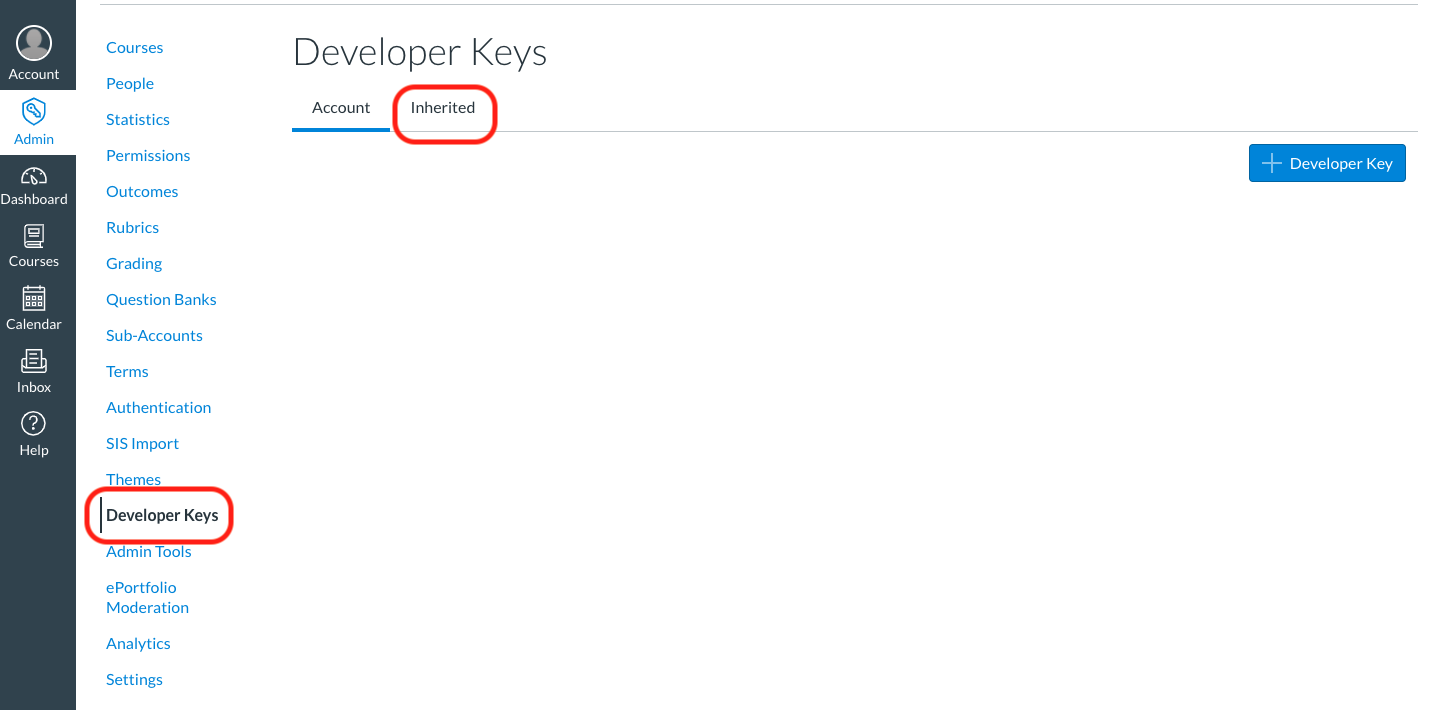
In Canvas, go to “Admin” > “Developer Keys” and click on the “Inherited”:

Enable Developer Keys in Canvas to connect to QuickSchools

From there, scroll down and find the “QuickSchools” app. You may need to to click on “Show All Keys” at the bottom to view more apps:

Enable the Developer Key to QuickSchools in Canvas

Finally, just turn on the Developer Key.

Connecting in QuickSchools

Back in QuickSchools, once the app is installed and enabled from the App Store, go to the Canvas App and click on the “Connect to Canvas” button:

Read More »

Patch Release – June 3, 2020

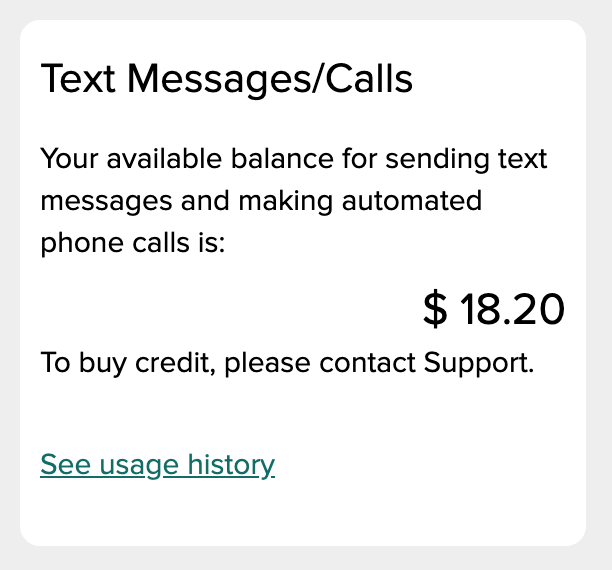
Unfortunately, QuickSchools has recently been targeted for Phone Fraud and the 809 phone scam. This is where a malicious user attempts to use the Voice Messaging feature to call toll numbers which charge exorbitant rates for calls. As a result, we’ve had to disable the “Buy Credit” feature for Paid Messaging in this patch release:

patch release by quickschools information

New schools will have to go through a verification process, before they can be allowed to purchase credit in order to make paid phone calls. If you see this message and would like to purchase credit, please contact our support team to have the feature reinstated.

Read More »

Patch Release – June 2, 2020

QuickSchools has just released some minor improvements to the Online Forms apps, to help schools with processing new students for the new school year. Improvements are described below:

Download Forms

As users are filling up the forms within your form packet, there is now a new “Download Forms” button, that allows users to download completed forms before submission:

Users can select whether to download all forms, or just specific forms from the packet:

Read More »

Developing New Features

Having served hundreds of schools over the past decade, and as we continue to serve schools worldwide, we get many requests to improve the QuickSchools product and service, from a variety of different markets and business needs. So how do we decide what gets worked on and what doesn’t?

Prioritizing based on Impact, Effort and Demand

First off, we have to make sure everything works, and works well, for all of our customers. So typically as we receive feedback from customers, we’ll work on features that have the biggest impact on our customers. This would typically include bug fixes, but also includes improvements to performance, security and usability. If something affects more of our customers, that’s what we’ll work on first.

The next thing we look at is the level of effort. Obviously, easy fixes tend to be worked on first, while harder and more involved solutions will take a longer time to address. We want to make sure any fixes we introduce do not create other issues in its wake. So complicated improvements will take longer as well.

Read More »

Temporary School Closures

The COVID-19 (or CoronaVirus) pandemic is adversely affecting many schools across the world. Schools are forced to adapt by implementing online learning solutions, to allow teaching to take place even while students stay at home.

At QuickSchools, we will be releasing new features to help schools adapt to this changing environment. In addition to improved integration to Google Classroom, we are also developing our own online learning tools, like Homework Submissions, and Online Grading. We hope to release these new features over the coming months.

But for schools who are unable to implement an online learning solution, and need to close their doors temporarily, if you plan to re-open in the coming months, please reach out to our support team about keeping your data active. Accounts that are cancelled or suspended are automatically removed from our servers in line with privacy laws. So if you cancel your account with us, and decide to come back a few months down the road, you will need to start a new account from scratch.

We understand that nothing is certain in these strange times. But we also have to be compliant with privacy laws like the General Data Protection Regulation (GDPR). Data that is removed intentionally, in compliance with GDPR, is removed permanently and cannot be recovered.

We hope that schools can remain open despite these challenges. Please let us know if there’s anything we can do to help deal with these challenges.

New Release – May 23, 2020

Here are the latest improvements in QuickSchools:

Online Learning Improvements

  • WYSIWYG for Homework
  • WYSIWYG for Lesson Plans
  • Remember selected Subject when moving between modules
  • Display Homework module on Student and Parent Portal

Featured Improvements

  • Option to copy gradebook formula on semester activation
  • Online Form Importer Bug Fixes and Improvements

General Bug Fixes / Improvements

  • Improve support for changing the Bell Schedule in Master Scheduler
  • New Framework for sending Emails from Summary Reports (App)
  • New Report Creator Filter for incoming days
  • Report Creator improvement for Communications Enabled
  • Improve server performance during cross-domain functions
  • General Security Improvements
  • Bug Fix when connecting to Stripe
  • Bug Fix when connecting to Google Classroom

Online Learning Improvements

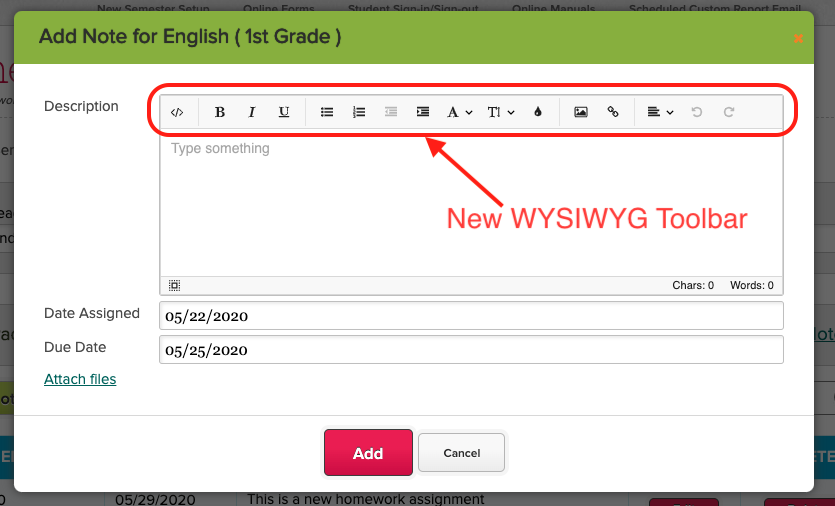
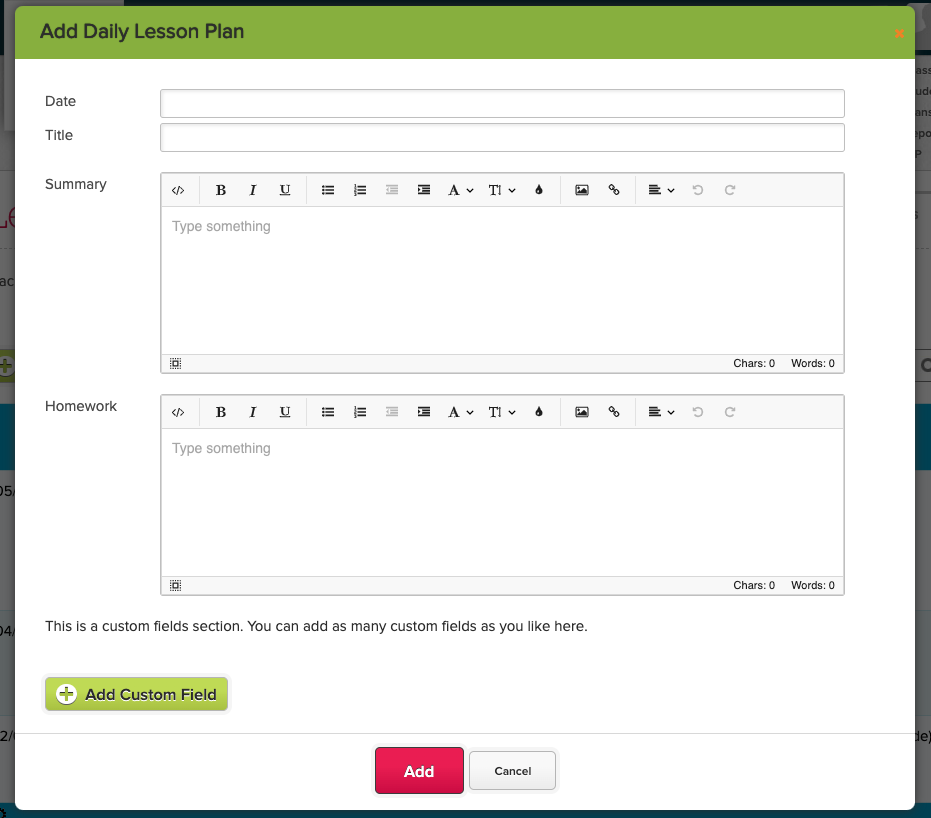
With more and more schools relying on QuickSchools to deliver online learning, we’re introducing a few new features in the coming months, the first of which is the new WYSIWYG toolbar when creating Homework and Lesson Plans:

online learning improvements
lesson plans quickschools

You’ll also find that when navigating between modules like Homework, Gradebook and Subject-based Lesson Plans, the system will remember the selected subject:

Read More »