
Online Form Improvements (D11)

QuickSchools has just released a few improvements related to the Online Forms module, with the recent Sprint D11 release:

Custom Dropdown Fields with Specific Values

When using Custom Fields for the Online Forms, there is a new option called “Drop Down With Value”:
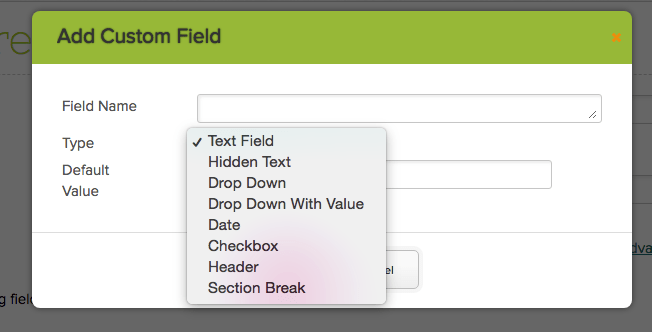
New "Drop Down With Value" Custom Field Type

When selecting this option, you can specify the display label as well as the selected value for the dropdown:

"Drop Down With Value" Custom Field Type supports Key-Value Pairs
“Drop Down With Value” Custom Field Type supports Key-Value Pairs

This is particularly helpful when enrolling students from the Online Forms module, and you want to map a custom field to a system field, when the student record is created. As per the example above, the drop down values may appear in Spanish, but when mapped to the Gender field, you can use the English terminology.

Bulk Change Status

When reviewing submissions, you can select multiple submissions, and bulk change the status of all selected submissions. Just select the “Bulk Change Status” from the dropdown:Read More »

Schoology Integration (D11)

With the new Sprint D11 release, we’ve updated the Schoology App to allow the Gradebook Sync to be scheduled between QuickSchools and Schoology. Just click on “Schedule Synchronization” button to schedule a new task:

Screen Shot 2018-08-15 at 1.02.39 PM

When configuring the task, you can specify for it to run once, or periodically (everyday or every week day) at the specified time:

Screen Shot 2018-08-15 at 1.02.57 PM

You can review completed and pending Gradebook syncs by clicking on the “Synchronization history”:Read More »

New Release: Sprint D11

Sprint D11 was released earlier this week. Here’s a list of the latest QuickSchools improvements:

  • Online Forms
    • Bulk Set Status
    • Custom Dropdown Values
  • Schoology Integration App
    • Gradebook Sync can now be Scheduled
    • Audit Trail for Gradebook Sync
  • Parent Messaging (see below)
    • You can now “Add Credit” and view “Usage History” from the main Parent Messaging Screens, instead of going to the “Account” page first.
  • Bug fix when Hiding Attendance Codes (Private Beta)
  • Bug Fix for Parent Portal Invitation Tag for Student Full Name (Private Beta)
  • Miscellaneous Improvements / Bug Fixes for Standards-Based Gradebook (SBG)

As always, details to some of these features will be posted to our blog later this week. You can also check out previous releases here. Please feel free to chat in with questions, comments or suggestions.

“Add Credit” and “Usage History”

When accessing paid messaging modules (for subscribed schools) like “Text Message” and “Voice Message”, there is now a link to “Add Credit” and view “Usage History”, which would typically only be viewable from the “Account” page.

Screen Shot 2018-08-15 at 11.37.54 AM.png

Need more time exploring your trial?

QuickSchools is an easy-to-use, no-strings-attached, comprehensive student information system (SIS). For those with fluctuating student counts, we charge month-to-month, based on the number of active students in your account.

What this means is, you’re under no obligation to enter ALL your students at the beginning of your subscription. You can always start with just a pilot group of students, perhaps just one grade-level, or even just one classroom. And later on, as you become more accustomed to our product and services, you can add the remaining students.

If you are at the end of your free trial, but you haven’t decided to commit, no need to worry. As mentioned above, you can start a subscription with just a sample set of students. And you can add your remaining students later on. You can cancel your subscription at any time.

To subscribe, simply click on the “Account” link on the top right, and follow the instructions.

8.2 blog

If / when you do decide to commit to QuickSchools as your SIS, we do offer a discount for long-term commitments, typically 12-months and above. Please contact our support staff, if you’re interested.

Latest Improvements to SBG (D10)

As part of our ongoing pursuit to perfect our Standards-Based Gradebook (SBG), QuickSchools is proud to announce 2 more improvements to the SBG functionality. With the latest Sprint D10 release, the QuickSchools Standards-Based Gradebook now supports:

  • Comments and Notes by Assessment; and
  • View Assessments by Standard

Comments and Notes by Assessments

When adding/editing an Assessment, we now have 2 new columns called Comments and Notes:

Comments and Notes for SBG Assessments

The Comments field is shared with students/parents when access via their portal. You can also see the comments on the student record. However, Notes are only visible to teachers directly from the SBG (similar to Private Comments in the regular Gradebook).Read More »

Module-Based Custom Fields

We announced early on in our QuickSchools journey that we support Module-Based Custom Fields. This is our way of keeping our system clean from unnecessary fields. So users could freely add whatever fields are needed to the various modules.

Module-Based Custom Fields

Right now, we support custom fields for the following modules:

This capability has also improved over time. In addition to creating new fields, users need to be able to perform certain tasks with these fields. These include:

  • Searching based on Custom Fields
  • Reporting on Custom Fields (via the Report Creator)
  • Support for multiple data types:
    • Text
    • Hidden Text
    • Date
    • Check Box
    • Drop Down
    • Drop Down with Values (See below)
  • For formatting fields, you can also add (1) Headers and (2) Sections Breaks.

In the Admissions module, where a student progresses from Inquiry to Application and then to the Students module, you can also transfer the Custom Fields between these modules, as long as the custom fields are created in exactly the same way.Read More »

New Release: Sprint D10

Sprint D10 has just been released. Here’s a list of the latest QuickSchools improvements:

Watermark on Trial Accounts

When viewing / downloading PDF files from a trial account, you will now see a watermark, which will be automatically removed when you subscribe:Read More »