New Release – Oct 21, 2020

Here are the latest improvements in QuickSchools:

LMS: Assignments and Live Stream modules (Beta)

  • Support for multi-user Zoom account
  • Automatically convert Homework to Published Assignments when installing the Assignments App
  • Save selected teacher and subject when admin user moves between screens
  • Disable notifications for Draft Assignments
  • Disable unpublished assignments from Student/Parent Portals
  • Pagination fix for Assignments listing
  • Miscellaneous Database Upgrades

Other General Improvements

  • Ability to Email Latest Receipt (See below)
  • New Safeguard when saving empty Gradebook
  • Trial Sign-Up supports verification code
  • Update semester activation from “Create Semester”
  • Update Lesson Plans module to support Assignments
  • Update Lesson Plans module to hide Homework when Homework is disabled
  • Bug fix when using UK-format with weekly scheduled tasks
  • Bug fix when searching for members in Library App
  • Bug fix when accessing Report Cards with empty link to Standards-Based Gradebook

NOTE: We had to one patch release since our last major release on September 28:

Email Latest Receipt

Due to popular demand, we’re introducing a new feature to Email Latest Receipt. From the Fee Tracking module, must select a few students / families, and then select “Email Latest Receipt” from the menu:
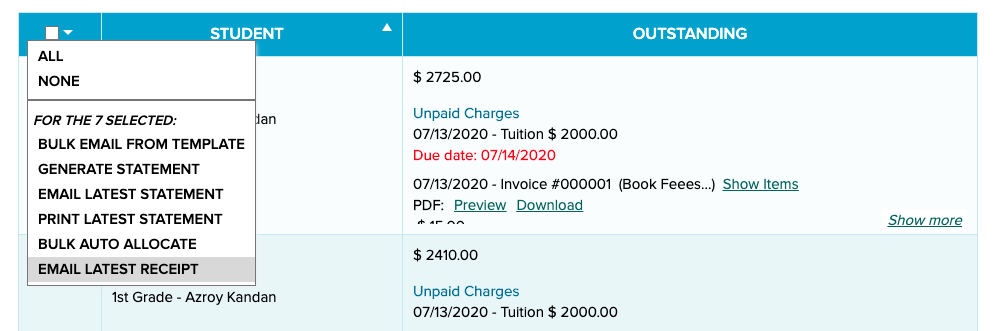
Email Latest Receipt

This feature works just like “Email Latest Statement”. A pop-up window will appear to confirm the action. You can also specify the sender information, as well as add an optional message:

Read More »
Creating New Report Cards

Report Card season is coming around. If you’ve previously set up report cards on QuickSchools, here are some quick pointers on how to configure new sessions based on your previous settings:

Creating a new session

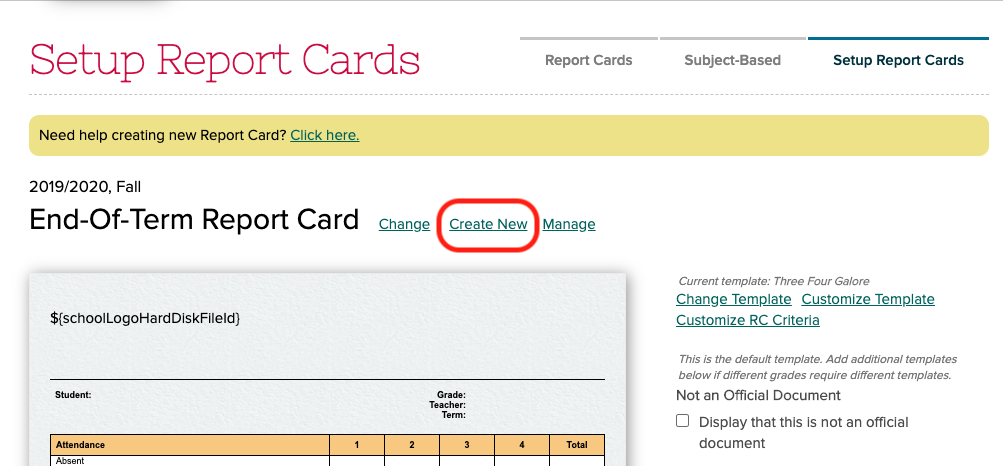
To create a new session, simply go to “Report Cards” > “Setup Report Cards” and click on the “Create New” link:

setup report cards with QuickSchools

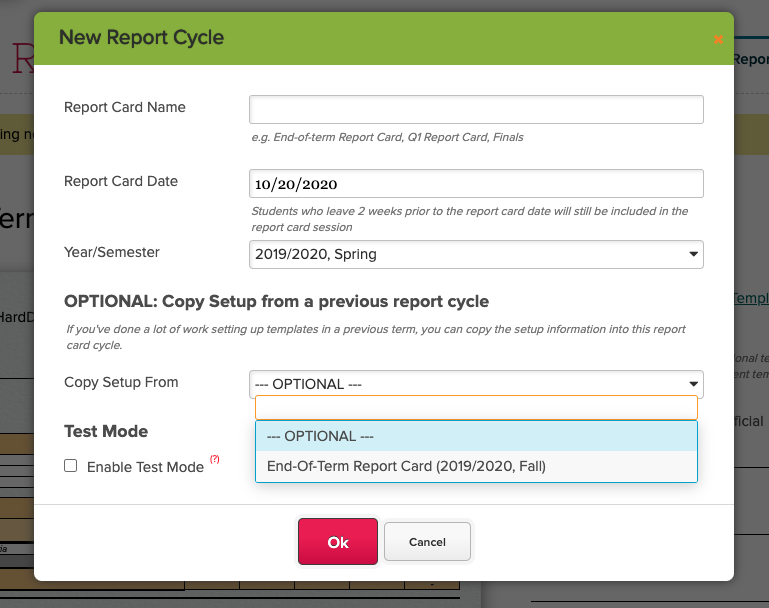
From there, you’ll just need to fill in the form. In particular, if you want to copy settings from a previous session, you can set the “Copy Setup From” field to a previously configured session:

new report cycle

NOTE: By default, when you create a new session, teachers will automatically get access to the session, in order to start filling in grades. Use the “Test Mode” feature to limit access to the report cards to specific users, in the event you want to make changes to the customization before allowing full access to teachers.

Read More »

New Release (Patch) – Oct 12, 2020

We’ve had a lot of usage with the Google Classroom Integration app that prompted an emergency patch that was deployed earlier this morning. We also included a quick fix to the Online Assignments app as well. Details of these improvements to QuickSchools are below: 

Google Classroom Enrollment Synchronization

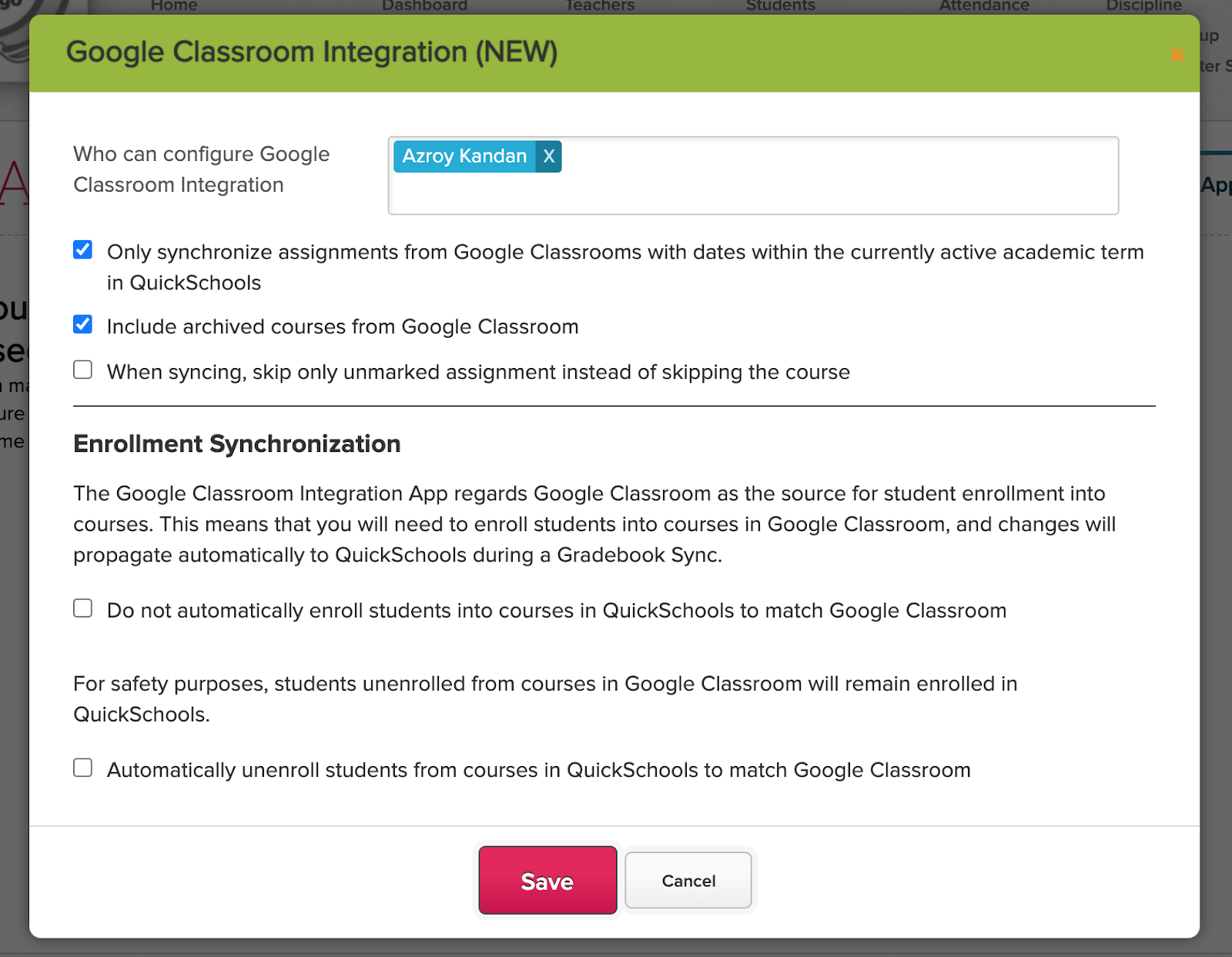
The Google Classroom Integration regards Google Classroom as the source for student enrollment into courses. This means that if you enroll a mapped student into a mapped course in Google Classroom, the same student will automatically be enrolled into the same course in QuickSchools. However, for safety reasons, if you unenroll a student from a course in Google Classroom, the student will remain enrolled in the corresponding course in QuickSchools. 

This new patch now provides schools with more control over the enrollment synchronization behaviour. When installing / configuring the app, you now have two new options:

  • Option to disable automatic enrollment of students into courses
  • Option to enable automatic unenrollment of students into courses
New Google Classroom Integration options to control the enrollment synchronization

These settings are optional. We typically expect courses to be linked one-to-one, but with the auto-enrollment enabled, it’s possible to have a single course in Google Classroom linked to multiple courses in QuickSchools (i.e. for combined courses). But on the flip side, whenever a new student is enrolled into a course, you’d now need to do it twice, once is Google Classroom, and again in QuickSchools.

Read More »

Quickschools Basics: New User Guide

As with many other systems, there are certain aspects of Quickschools that all users need to be familiar with. Below, we share details useful to all new users, including:

Logging In

Before you begin using Quickschools, you first need to be invited to join the school’s existing account. Only school administrators will be able to send an invite, so you may need to contact the school directly.

The invitation will be sent to the email address the school has on file for you. The email will include the school’s unique URL, your username, and your temporary password. Be sure to save the URL as it will be needed to log in in the future.

The email will provide you with details on how to log in

After you follow the link provided, simply enter in your username and password to log in.

Enter in your username and password to log in
Read More »

Private Messaging: A Summary

Among the many communication features we offer within Quickschools, Private Messaging is one we expect to be increasingly utilized as schools transition to a virtual setting. If you have not used this feature before, here’s a quick summary on what it offers.

Private messaging is available on the upper right, next to your name

Before you begin using it, you’ll want to make sure that the feature is properly configured. Teachers and Admins can message each other right away, but it needs to be enabled for Students and Parents. These settings can be found while configuring the Parent Portal and Student Portal in the “Turn Features On/Off” page:

Configure the Parent Portal and Student Portal to enable Private Messaging
Read More »

Developing New Features

Having served hundreds of schools over the past decade, and as we continue to serve schools worldwide, we get many requests to improve the QuickSchools product and service, from a variety of different markets and business needs. So how do we decide what gets worked on and what doesn’t?

Prioritizing based on Impact, Effort and Demand

First off, we have to make sure everything works, and works well, for all of our customers. So typically as we receive feedback from customers, we’ll work on features that have the biggest impact on our customers. This would typically include bug fixes, but also includes improvements to performance, security and usability. If something affects more of our customers, that’s what we’ll work on first.

The next thing we look at is the level of effort. Obviously, easy fixes tend to be worked on first, while harder and more involved solutions will take a longer time to address. We want to make sure any fixes we introduce do not create other issues in its wake. So complicated improvements will take longer as well.

Read More »

Temporary School Closures

The COVID-19 (or CoronaVirus) pandemic is adversely affecting many schools across the world. Schools are forced to adapt by implementing online learning solutions, to allow teaching to take place even while students stay at home.

At QuickSchools, we will be releasing new features to help schools adapt to this changing environment. In addition to improved integration to Google Classroom, we are also developing our own online learning tools, like Homework Submissions, and Online Grading. We hope to release these new features over the coming months.

But for schools who are unable to implement an online learning solution, and need to close their doors temporarily, if you plan to re-open in the coming months, please reach out to our support team about keeping your data active. Accounts that are cancelled or suspended are automatically removed from our servers in line with privacy laws. So if you cancel your account with us, and decide to come back a few months down the road, you will need to start a new account from scratch.

We understand that nothing is certain in these strange times. But we also have to be compliant with privacy laws like the General Data Protection Regulation (GDPR). Data that is removed intentionally, in compliance with GDPR, is removed permanently and cannot be recovered.

We hope that schools can remain open despite these challenges. Please let us know if there’s anything we can do to help deal with these challenges.