New Release – Apr 18, 2022

Today’s release focuses primarily on the Orchestra Master Scheduler, with some general improvements to several modules and beta apps:
quickschools april 18th 2022 updates

Here is a list of the latest QuickSchools improvements:

Master Scheduler Improvements

  • Refactor support for Pathways
  • Improve how Next Grade is handled with and without SIS
  • Improve grouping and sorting of courses in Step 1 Course Request Templates
  • New Tool tip in Step 2 for Student Portal Access
  • Support Weekly Schedule for Bulk Create Teams in Step 4
  • General improvements to Distribute function in Step 4
  • General improvements to Rejection Analysis in Step 4
  • General improvements to Allow Conflicts in Step 5
  • Move option to “Distribute vs. Randomize” to the “Scheduling Algorithm” in Step 5
  • Show Teacher Caseload in Step 5
  • Fix support for Low/High Grade when running Step 5
  • Add support Step 5 Optimize in Debug function
  • System Configurable Seeds for Step 5 Optimize (Beta)
  • Improve finalizing sections in Step 6 when academic term has not yet been activated
  • Improve tracking History of changes in the Enrollment Period
  • Add Course Conflict Levels to Report Creator

General (Functional) Improvements

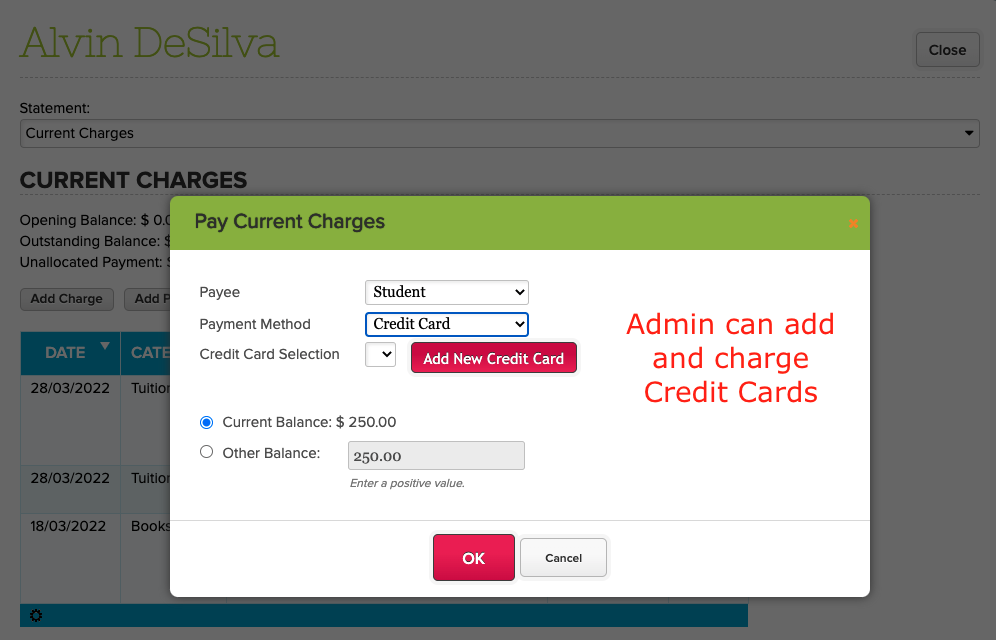
  • Allow Administrators to Add Credit Cards for Online Payments
  • Simplified Schedule supports searching by Course Code
  • Display Refund Amount in Student Billing for Stripe Payment is refunded

General Bug Fixes

  • General improvements to the Fee Tracking “Unallocated Payments” screen
  • Bug fix for Simplified Scheduling to maintain search results after table is refreshed
  • Bug fix for handling Gradebook Formulas in Report Cards
  • Bug fix for handling Gradebook Categories when integrating with Canvas

Beta Improvements / Fixes

  • Add support for 8th Grade in new Transcripts and Graduation Requirements
  • Bulk Send Text Message from Self-Enrollment App
  • General improvements to Online Test app
  • General improvements to Audit Trail framework

Improvements to Online Payments

As you can see from the screenshot above, we’ve added the ability for administrators of the Fee Tracking module to add credit cards on behalf of students and parents. Credit Cards can then be charged individually and processed through Stripe.

In the near future, we’re looking to expand the Online Payments capabilities within QuickSchools. This includes the following:

  • Ability to Bulk Charge Credit Cards
  • Ability to schedule charging of Credit Cards
  • Expand support for ACH (Bank Transfer)
  • Payment Plan functionality
  • Shopping Cart functionality

If any of these features interest you, please let us know via Chat or Email. We’d love to hear your thoughts as we build these features further.

New Release – Mar 30, 2022

Today’s release focuses primarily on the Orchestra Master Scheduler, and fixes to our new Online Testing module, now moving to Private Beta:

orchestra k12 master scheduler

Here is a list of the latest QuickSchools improvements:

Master Scheduler Improvements

  • New option to sort courses by name or code in Step 4
  • Ability to Color Code courses by Department in Step 4
  • Ability to Color Code days in Step 5
  • Ability to Allow Conflicts during “Load” in Step 5
  • Ability to distribute students in Step 4 when a teacher is added / removed
  • Hide “Activate” button in Enrollment Period for non-SIS
  • Fix Grade Filter in Scheduling Algorithm in Step 5

LMS Improvements

  • My WorkSpace Chat Console (Beta)

General (Functional) Improvements

  • Ability to schedule “Recalculate Fields” for Transcripts
  • Ability to preview attachments in Admissions
  • Show Submitter Name in Online Forms when Submission is not linked to a student
  • Schedule Standard Charge moved out of Beta
  • Add Course Department to Report Creator

General Bug Fixes

  • Remove Resigned Teachers from Dropdown for Attendance Rosters
  • Fix bug related to Add/Drop History
  • Fix Documents Tag in Admissions module

Beta Improvements / Fixes

  • Ability to relabel Interventions
  • Improve Framework for Audit Trail

New Release – Mar 8, 2022

Today’s release focuses primarily on the Orchestra Master Scheduler, multi-period Section Attendance, and our new Online Testing module, now moving to Private Beta:

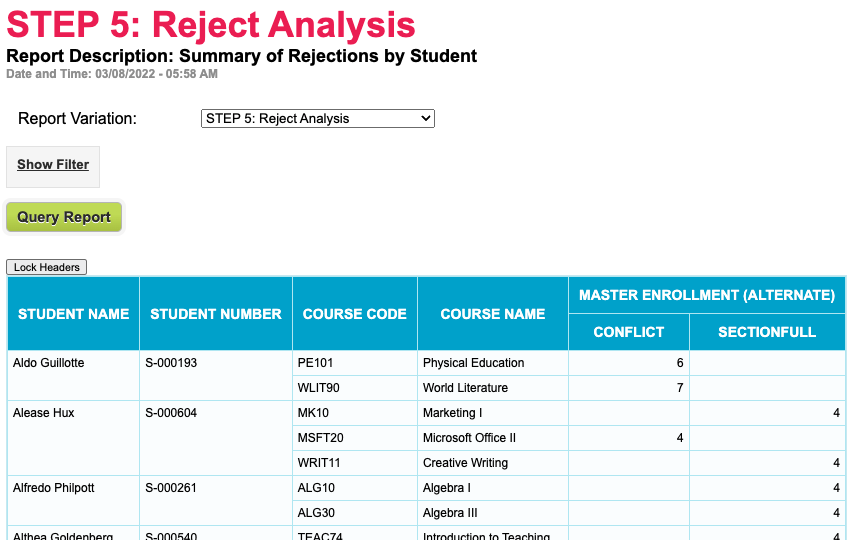
New “Reject Analysis” Summary Report for Orchestra Master Scheduler

Here is a list of the latest QuickSchools improvements:

Master Scheduler Improvements

  • Expand functionality for Reject Analysis
  • Improve Filter Department in Step 4
  • Improve how sections are cleared by department in Step 4
  • Bug fix when optimizing student schedule in Step 5
  • Bug fix when printing student Schedule PDF with SIS enabled

LMS Improvements

  • Online Testing Framework Improvement (Beta)

General (Functional) Improvements

  • Improve integration with Ignitia / OdysseyWare
  • Expand support for Multi-Period Section Attendance

General Bug Fixes

  • Bug Fix Subject Criteria in Report Cards when student is enrolled for part of the year.
  • Bug Fix when configuring Attendance Calendar

Beta Improvements / Fixes

  • Import Student Grade Level by Academic Term
  • Improve how current subject enrollment is compared against capacity
  • Improve support to relink schools within a Group

Online Tests App is moving to Beta

In the coming days, we’ll be launching our new Online Tests App in Beta. While in Beta, we’ll be seeking help from schools to suggest refinements / improvements  to the Online Tests app.

Read More »

Patch Release – Feb 21, 2022

QuickSchools released a mini patch to address various improvements. 

Here are the latest Improvements in this patch:

Our next scheduled release is targeted for the week of March 7, and should include more improvements to the Master Scheduler and Section Attendance. If you have any further questions or suggestions for improvement, please chat with us online. We look forward to hearing from you

New Release – Feb 14, 2022

Today’s release focuses primarily on the Orchestra Master Scheduler, plus minor improvements to our new Online Testing module (Alpha) and Student Information System.

New option to Bulk Lock/Unlock Section Assignments in Step 5 of the Orchestra Master Scheduler

Here is a list of the latest QuickSchools improvements:

Master Scheduler Improvements

  • Option to Search/Sort Courses by Department ni Step 1
  • Option to Search Teachers by Department in Step 1
  • Option to Resync configured Teacher Names in Step 1
  • Option to color code the days in Step 4
  • Expanded Options to Bulk Lock/Unlock Section Assignments in Step 5 (see above)
  • Option to Clear Section Assignments by Department in Step 5
  • Option to Ignore Teacher Assignment when Loading Step 5
  • Highlight successful Load in Step 5
  • Support Weekly Schedule when finalizing Sections in Step 6 with SIS
  • Bug Fix Copy Target Students
  • Bug Fix Step 5 Student Count for large schools
  • Bug Fix Step 5 When Loading course requests linked to courses that are no longer offered
  • Bug Fix Schedule PDF with SIS enabled

LMS Improvements

  • Online Testing Framework Improvement (Beta)

General Bug Fixes and System Improvements

  • Remove support for deprecated payment gateway
  • Miscellaneous API improvements for Mobile App
  • Fix minor typo during Bank Account Verification for Student/Parent Portal

New Release – Jan 24, 2022

Here’s our second release for 2022. We continue to make improvements to the Orchestra Master Scheduler, PLUS, general improvements to our new Online Testing module (Alpha) and Student Information System.

Support multiple day combinations for a specific Course in Step 2

Here is a list of the latest QuickSchools improvements:

Master Scheduler Improvements

  • Support multiple day combinations for a specific Course in Step 2 (Image above)
  • Option to Clear Sections by department in Step 4
  • New feature to add/edit/move specific sections within the Weekly Schedule in Step 4
  • Re-add support for Teams in Weekly Schedule in Step 4
  • New Importer for Sections linked to Courses (for SIS)
  • UI Improvement for Sections with Weekly Schedule (for SIS)
  • Bug fix when adding Course Requests from the Student record
  • Bug fix when copying Next Course to new Enrollment Period
  • Bug fix when loading Course Requests in Step 2

LMS Improvements

  • Online Testing Framework Improvement (Beta)

General (Functional) Improvements

  • New History for Standards-Based Gradebook (See below)
  • Option to manually add orders to the Lunch Ordering app
  • Support for external Thank You page for Embedded Admissions Application Form
  • Support for required files for upload for Admissions Application

General Bug Fixes and System Improvements

  • Alerts module is not out of Beta (See below)
  • API Improvements for Trial Sign-Up
  • General improvements to the Standards-Based Gradebook
  • Bug fix student access with student portal is deactivated
  • Bug fix for Homework module accessing Archived Semesters

Other Private Beta Improvements

  • Hide “Link Children in Other Schools” tab for Group School
  • Hide inactive students from Parent Portal for Group School
  • Retain parent info for siblings are they are deactivated for Group School
  • Bug fix for maintaining teacher records for Group School

Standards-Based Gradebook History

The Gradebook History / Versioning App has been extended to include the Standards-Based Gradebook. This means that with the feature installed, you’ll see a history link at the bottom of the Gradebook:

Read More »

New Release – Jan 3, 2022

Welcome to 2022. And here is the first release of the year. We continue to make improvements to the Orchestra Master Scheduler, as well as the the Learn LMS module, PLUS, general improvements to our Student Information System.

Here is a list of the latest QuickSchools improvements:

Master Scheduler Improvements

  • Support for Triple Periods
  • Option to clear sections for a particular course
  • Re-add support for Teams in Weekly Schedule (Private Beta)
  • Bug fix Schedule PDF for invalid/orphaned section enrollments
  • Bug fix Step 2 Course Request report for students with “No course requests”
  • Bug fix Step 6 Finalize Sections when SIS is enabled

LMS Improvements

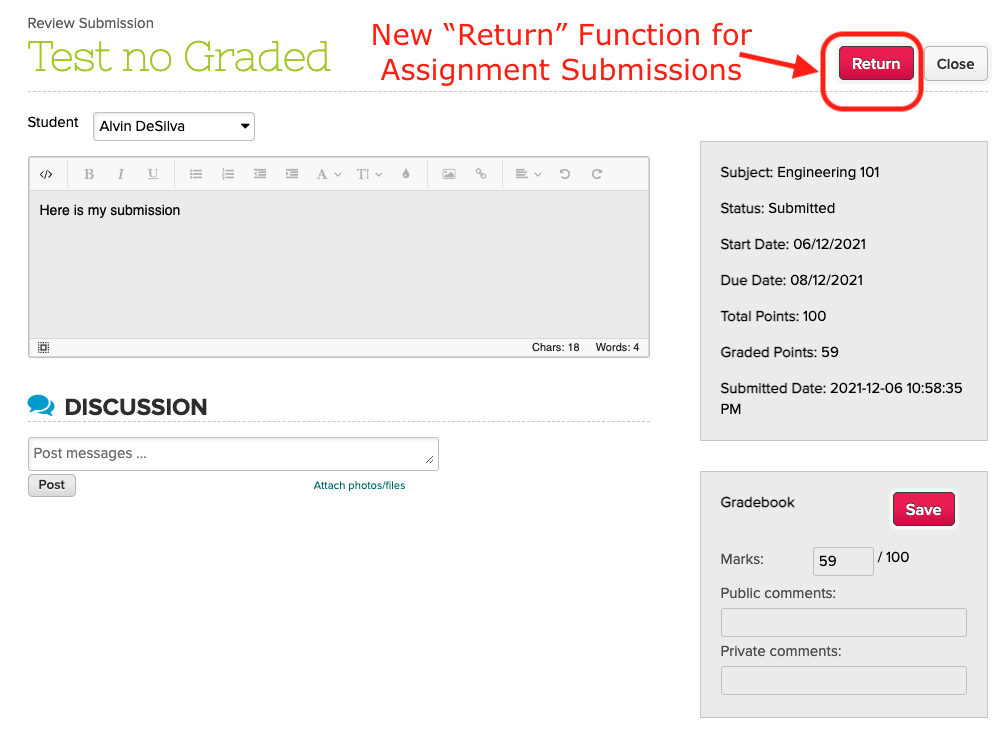
  • New option to “Return” an assignment (see above)
  • Reminder to save Assignment
  • Online Testing Framework Improvement (Alpha)

General (Functional) Improvements

  • New Semester Setup is enabled by default for new Trial Accounts
  • Ability to archive Academic Year (see below)
  • Support long descriptions for letter grade in Gradebook (see below)
  • Track history of emails sent from Gradebook (see below)
  • Show amount due for Fee Tracking in main Student Updates in Student and Parent Portals
  • New Payment Notes when making payment from Student/Parent Portals
  • Support Primary Payer in Report Creator

General Bug Fixes and System Improvements

  • Reposition the “Hide Announcements” button
  • API improvements for Mobile to support Class Discussions and Student Message Board
  • Bug accessing assignment when gradebook column is deleted while linked to a Scale Score.
  • Bug fix when enabling student name format without changing the format
  • Bug fix Error when adding subjects from the “Subject Setup” menu
  • Bug fix Subject Import by Subject ID 
  • Bug fix Summary Report accessing Student Profile Images
  • Bug fix Summary Report accessing deleted Custom Attendance Codes

Other Private Beta Improvements

  • Ability to disable comments for Class Discussions from Student and Parent Portal
  • Show Capacity when editing courses from the Student record
  • Support Mandatory Payment Notes when making payment from Student/Parent Portals
Read More »

New Release – Dec 13, 2021

As we approach the end of the calendar year, our engineering team is focusing on general framework and infrastructure improvements, as well as miscellaneous bug fixes. We’re also continuing to make improvements to Alpha and Beta features for next year, like our Learning Management System (LMS), the Dashboard and Audit Trail.

quickschools gradebook

Here is a list of the latest QuickSchools improvements:

Master Scheduler Improvements

  • Hide Courses that are not offered in Step 4
  • Fix loading of Days and Frequency and Weekly Schedule is configured
  • Hide SIS-related fields when SIS is disabled

LMS Framework Improvements (Alpha)

  • My Workspace Chat
  • Online Testing

General (Functional) Improvements

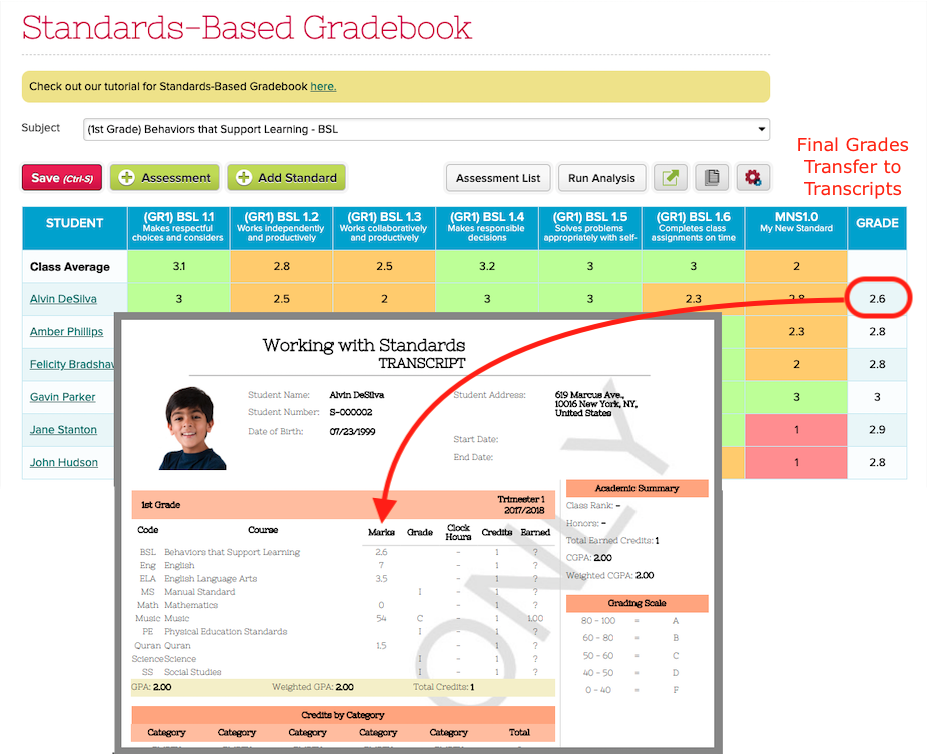
  • Integrate Final Grade from the Standards-Based Gradebook (SBG) to Transcripts
  • Ability to bulk sync Gradebook with Report Cards prior to locking (see below)
  • Improve support for Scale Score in Gradebook Templates (see below)
  • New Date Filter when Bulk Print Gradebook PDF (see below)
  • New Search for Teacher Documents
  • Show latest submission when reviewing/grading Assignments
  • Label for Sign-In / Sign-Out App
  • Support Capacity in Subject Importer
  • Remove white space from Student Number when calling Student API Resource
  • Support sync grades from Odysseyware / Ignitia based on Academic Semester Start/End Dates
  • Automatically update student full name when format is changed 
  • Reduce logo size in footer

General Bug Fixes and System Improvements

  • Fix Attendance Taken for Homeroom when Alternate Homeroom Teacher is enabled
  • Fix limit on student list in Montessori App
  • Properly delete subject enrollments where student is permanently deleted
  • Improvements to EMail Messaging via MailGun
  • Improve security for generated PDFs
  • Add Support for Start Date for Announcements

Other Private Beta Improvements

  • Improve KPI widget for Dashboard
  • Hide Attendance from Restricted Dates
  • Self-Enrollment Improvements
    • Improve how limits are handled
    • Option to Hide Self-Enrollment limits in instructions
  • Limit Enrollment by Capacity from Students listing
  • New importer for student usernames and passwords

Bulk Sync Gradebook with Report Cards

If you need to run reports on Report Cards prior to locking/publishing, and you have a hard time getting all your teachers to Submit Grades from Gradebook, we have a new feature that allows admins to pull the grades from all Gradebooks into the Report Cards. Check out the new “Sync Grades” button, available when you “Manage” Report Cards:

Read More »