Standard Charges for Specific Students

We wrote some time back about our Standard Charges feature. Here’s the original article:

We think it’s worth noting again on the philosophy behind the QuickSchools implementation of Standard Charges, and how schools can customize how students are charged periodically based on specific conditions for the student.

What is a Standard Charge?

A standard charge is basically the ability to apply a specific charge en masse to a group of students. This includes charges as well as credits and discounts.

Standard charges are most applicable in situations where you have different charges for students with siblings, or students of staff, or students with parents from the military, etc. Basically, if there’s ever a case to provide a discount based on some condition, you could use our “Standard Charge” feature to facilitate charge of fees to that student.

How to Create and Customize a Standard Charge?

To create a standard charge, go to the “Standard Charges” sub-menu (under the main “Fees Tracking” menu). From there, click on “Add Standard Charge”. You can then create items (or a fee structure) to the standard charge.

Adding / Modifying a Standard Charge

Customization of the Standard Charge is done when you “Apply” the charge. When you click “Apply”, there is an option to “Preview & Customize”:

Applying a Standard Charge

Using this feature, you can further refine how charges are applied to specific students. You can remove charges from the original Standard Charge, as well as create new charges specific to a student:

Read More »

QuickSchools is Great for Adult Programs, Small Colleges & Trade Schools

QuickSchools is great for all kinds of adult programs and colleges, not just K12 schools. This includes trade schools, colleges, vocational institutes, etc. If you have a school for adults, albeit a nursing school, beauty school, driving school, seminary institute or a school for culinary arts, you can take advantage of QuickSchools to keep track of performance, communicate with all your students and much more.

The first time you sign up for a free QuickSchools trial, you’ll notice that your account is configured for K-12 by default. But you can very easily change your settings to accommodate your particular type of school:

11.20 Blog Photo 1

Click here for help getting started: Setup Guide for Colleges & Trade Schools

Can I Edit/Delete Fees?

The Fee Tracking module in QuickSchools is a very useful tool for tracking and communicating fees and payments with students and parents. In some case, schools may even allow students and parents to make payments online. Although this Fee Tracking module is not a full blown accounting module, we do adhere to certain accounting principles in order to allow the current and future integration of the Fee Tracking module with external accounting programs.

Fee Transactions can only be Deleted, not Edited

In the accounting world, transactions should never really be edited, or even deleted. When an error is made, usually a new transaction needs to be created to offset the original transaction. As a result, our fee tracking module currently does not allow transactions to be edited. So if a mistake is made during data entry, the user will either need to delete the original transaction, or create a new transaction to offset the error.

Locking/Publishing Report Cards

The first time you create a new QuickSchools Report Card set, they are not accessible in the student or parent portals. After all, recently created report cards need time to be filled and reviewed. Once the report card set is locked, and no further changes can be made, they are ready to be published online for parents and students to view.

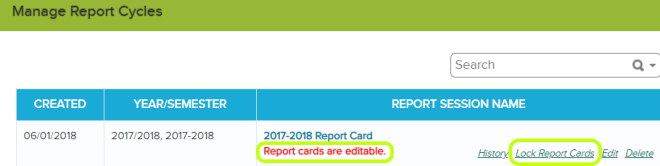
Once you are satisfied with your report card set, you can lock it:

11.14 Blog 3

This will make it so that the report cards are no longer editable, if a teacher needs to make changes to a report card an admin will need to unlock the report card set before any changes can be made:

11.14 blog 4

Upon locking the report card set the system will automatically publish all report cards to the student and parent portals. If you want to prevent certain parents from viewing report cards online you can do so by simply deactivating the students report card, see details here – Hide Report Card from Student/Parent Portal

If a report card set was locked inadvertently we have function that will allow you to sync any updates that were made to grades after the fact see more here: Clear Locked Values

We also have a “History” link connected to each report card set that tracks any changes, you can use this link to see when and who locked a report card set:

11.14 BLOG 5

IMPORTANT! One final note, when you create a new report card session, by default the system locks and published the previous session.

We have a new beta feature that allows you to turn off the auto locking function, this will give you the ability to work on multiple sessions at once. Please chat in with us if you find that you need this turned on in your account.


Hide Report Card from Student/Parent Portal

QuickSchools gives schools the ability to publish report cards online to the Student Portal and Parent portal. School admin have full control over which report cards get published. When a report card set is locked by default all students report cards are set to activated and are automatically published to the portals.

If you do not want a certain student or group of students report cards to be visible online you can simply deactivate the report card for those students. You can do this by clicking “Deactivate” next to the report card or by selecting several report cards and then selecting “Deactivate” from the drop down menu:

11.14 Blog 1

Deactivated report cards will not appear in either the student or parent portal. See more here.

Online Forms: Auto-Emails Based on Status

QuickSchools Online Forms app allows you to configure e-mail templates and send out e-mail notifications automatically. You can send auto emails when someone is invited to fill out a form or when someone makes a submission.

You can also send out emails based on form status. For example, if students are accepted into your site you can add an “Accepted” status and send them an email welcoming them to your school or if some submissions are in progress you can send an email with a reminder to fill out forms. Statuses are configured in your form packet under “WorkFlow”:

11.8 Blog 1

Once your statuses are entered there you will be able to report on them:

11.8Blog 2

Once your statuses are setup you can Send an Email From Report Creator to form packets based on status. Please chat in if you need any help setting this up.

Online Forms Cross-Browser Compatibility

We recently discussed how you can use Fillable PDF Forms in the Online Forms app. The philosophy behind the Online Forms app is to digitize a paper form submission process. But the subject of cross-browser compatibility is a complex one. Depending on how you set up your Online Forms, the forms itself may not be cross browser compatible.

For schools using Fillable PDF forms, for full cross-browser compatibility, your PDF forms will need to be converted to another format called Scalable Vector Graphics (or SVG for short). Right now, the process of converting PDF forms to SVG is a manual one, and requires that schools engage with the QuickSchools support team to make the conversion. In the future, we’ll be automating this process so that uploaded PDF forms are automatically converted to SVG for full cross browser compatibility.

Note also that the SVG conversion that we employ does not currently support all input forms, like dropdowns. So to discuss these differences (i.e. advantages and disadvantages), we’ve provided the table below:

Custom Fields

Native Fillable PDF

PDF Converted to SVG

Limited control over layout of fields. Font and font sizes would need to be controlled via a custom CSS. Full control on layout of fields, fonts, and font sizes. Can also include images, like a regular PDF. Full control on layout of fields, fonts, and font sizes. Can also include images, like a regular PDF.
Full cross-browser compatibility. Also runs on mobile devices. Limited cross-browser support. Runs primarily on Google Chrome. Full cross browser support. Also runs on mobile devices.
Support for all fields input types: Text, Dropdowns, Checkboxes, etc. Support for all fields input types: Text, Dropdowns, Checkboxes, etc. Supports Basic Input Type, like Text and Check Boxes. Does NOT support Dropdowns.

We’ll hopefully expand SVG support to include dropdowns, but for now, dropdown support is only available for either Custom Fields or Native Fillable PDF. If you’d like to learn more about our Online Forms app, and cross-browser compatibility for PDF forms, please feel free to reach out to our support team.

Fillable PDFs for Online Forms App

QuickSchools Online Forms app allows you to upload fillable PDF forms into your form packet. This gives you the ability to turn your paper forms into a fully online form packet! Check out an example below:

11.6 Online Forms Blog

A great tool that we suggest for making PDF forms fillable is https://www.pdfescape.com/. PDF Escape allows you to create fillable PDFs for FREE! Check out the video below for instructions on how to use PDF Escape: How to Create a Fillable PDF Document for Free

Read More »