The Fileroom App is an add-on feature that is available in the QuickSchools App Store. This app allows files to be uploaded and shared between Teachers, Parents, or Students.
With this App, you can do the following:
Upload files into a shared, central location
Create your own folder structure for storing files
A separate Fileroom for teachers and parents
Virtual Hard-drive
100 GB of storage
To know more about our Fileroom App, feel free to check out our Support Article linked below:
We understand how busy a Teacher’s day can get, and how this may lead to them forgetting to take attendance in QuickSchools. To resolve this, we now introduce a new feature — the Attendance Dashboard.
This feature is in BETA: If you would want this enabled for your school, please contact our Support Team.
This new feature would display the periods of a given day where attendance is Not Yet Taken. It is applicable for Homeroom, Period, or Subject-Based Attendance, and allow the Global Attendance Takers to either (1) Take attendance on behalf of the teacher; or (2) Send an Email notifying the teacher of the attendance yet to be taken.
To know more about our Attendance Dashboard feature, please see our Support Guide linked below:
I just wanted to express a quick thanks to all those who attended our webinar earlier today on the QuickSchools Gradebook. We covered a LOT of features in a short period of time, and so we went a little fast:
If you’d like access to a recording of the webinar, please fill in the survey that was sent to you. The recording is only available to subscribed schools. But we do have a copy of the presentation available below:
Finally, just a quick reminder that our Webinar Series will continue next month on the topics of Online Forms. This is also a large topic, and we may break it up into multiple sessions, to go over the various components. We look forward to seeing you there.
Zapier is essentially a GUI interface that allows user to use pre-built, or build your own, integrations to any system that has open APIs. This means that you can readily integrate QuickSchools with any other system, using Zapier as the go-between.
To facilitate this integration, you will need to first establish a link between Zapier and an external system (like QuickSchools). From there, you can create either a Trigger or an Action.
A Trigger is essentially an API call to an external system to search for new/updated records. This would be the event that would initiate a ZAP and facilitate an Action. (Example: Find new students in QuickSchools)
An Action would then be an event performed to PUSH data into an external system. This would essentially add/update the data. (Example: Add a new student into QuickSchools).
Zapier is useful to integrate other systems with QuickSchools, making the process of moving data from an external system to QuickSchools (or vice versa) really easy. The integration is described in more detail in our Support Article linked below:
This guide would cover the following required for the integration:
Setting up Zapier
Setting up API in QuickSchools
Creating a Trigger
Creating an Action
Creating a Zap
If you have any questions or concerns with the setting up your Zapier Integration, feel free to contact us via chat or email us at support@quickschools.com.
THIS IS A BETA FEATURE: To have this feature enabled, please contact our Support Team.
This feature allows you to synchronize your Google Classroom courses in batches. This is ideal for schools will a large number of students and courses.
Some things to note about this feature:
Profiles are dependent on the courses being mapped under STEP 3.
Courses that aren’t mapped in STEP 3, will not be available in the Profile
If a course is unmapped in STEP 3, the course will also be automatically removed from the Profile.
When courses are remapped in STEP 3 at the start of a new semester, the Profile will also need to be updated with the latest mappings. Mappings from the previous term will no longer apply.
To avoid the sync getting timed out, we recommend having a maximum of 35 courses per Profile.
Multiple Profiles can be scheduled to be synced at the same time. However, each profile will be synchronized one at a time.
To know more about our Google Classroom Synchronization Profiles, see our Support Article linked below:
We have a webinar coming up for teachers, focusing on the Gradebook module in QuickSchools. This is part of our new Webinar Series. Be sure to register if you haven’t already.
QuickSchools Gradebook
During this webinar, we’ll be going over some of the more involved features, including:
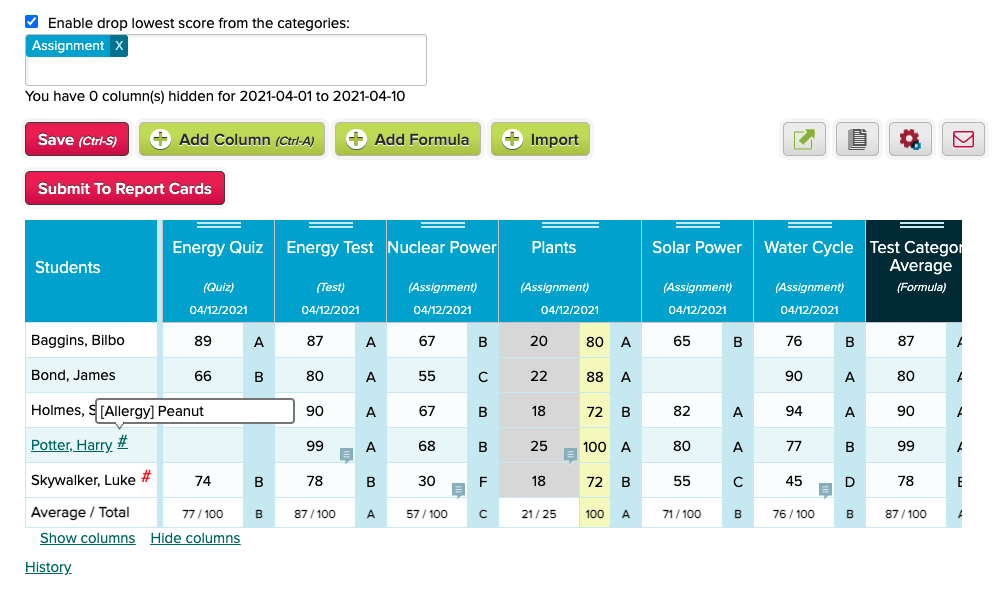
Gradebook Formulas and Weightages
These are the basics of using Weightages (or Weight Factors) to create formulas.
Introduce Send History when sending Email from Templates – See below
Improve performance when emailing attachments from modules (Report Cards, Gradebook, Fee Tracking)
Miscellaneous bug fixes related to attachments
Other General Improvements
NEW: Attendance Dashboard for Not-Yet-Taken (Beta) – See below
Improve how Summary Reports are run for long queries
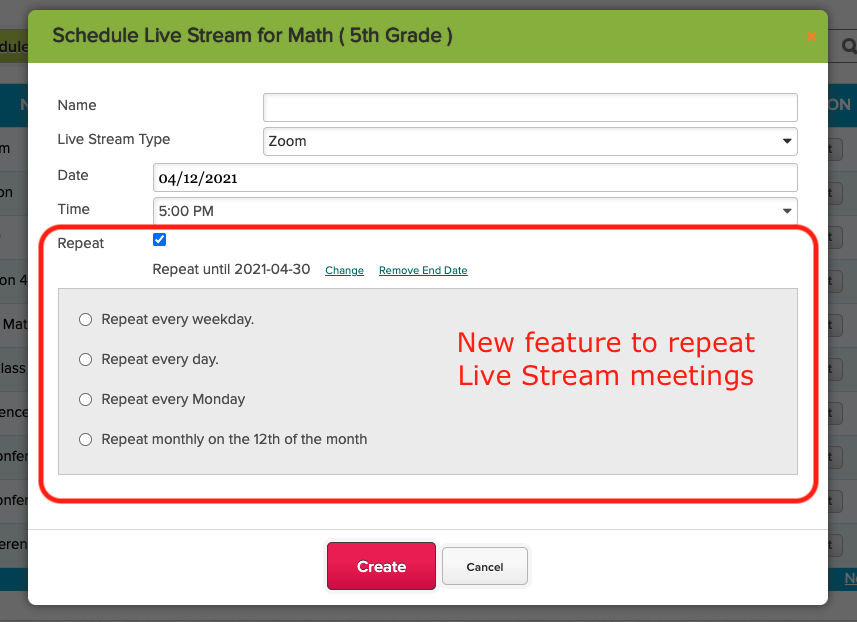
Live Stream now support recurring meetings
Search Student by Email Address and Phone Number
Ability to Schedule Synchronize with Sync
Ability to disable Chat Box for Online Forms – See below
Fileroom App now supports sharing with Students
Improve Search on Teachers Lounge (Beta)
School Notes for new Self-Enrollment (Beta)
Miscellaneous improvements to Announcements
Miscellaneous improvements to Master Scheduler
Bug fix when managing Live Stream for Teachers
Bug fix when a new document is uploaded to the Student record
Mapping Students in Google Classroom
When mapping students in Google Classroom, the system now displays the email address, so that it’s easier to match students. This is particularly useful when students use their own personal Google Accounts for Google Classroom, and thus may have names in a foreign language:
A big thank you to all of you who were able to join in on yesterday’s Quickschools webinar, which covered the Admissions module. We hope the webinar was insightful and helpful as you move forward with collecting inquiries and applications for the next academic school year.
As our webinar series continues, we would like to invite all teachers to join in later this month for our Gradebook Webinar. We will not only be covering the grading aspect of the Gradebook, but will also go over the best tools available to prepare for parent/teacher meetings, and built in reporting/messaging to keep parents and students up to date.
The Gradebook webinar will be held on April 20th – 01:00 PM (Eastern Time). Teachers, and administrators, who are interested in joining should follow the link available in the Home page of their account to sign up. We hope to see you there!