Mini Release – Oct 18, 2021

Although we had a release last week, today’s release is to consolidate framework changes we’ve been making on our new Orchestra Master Scheduler. We also took this opportunity to piggy back some minor improvements.

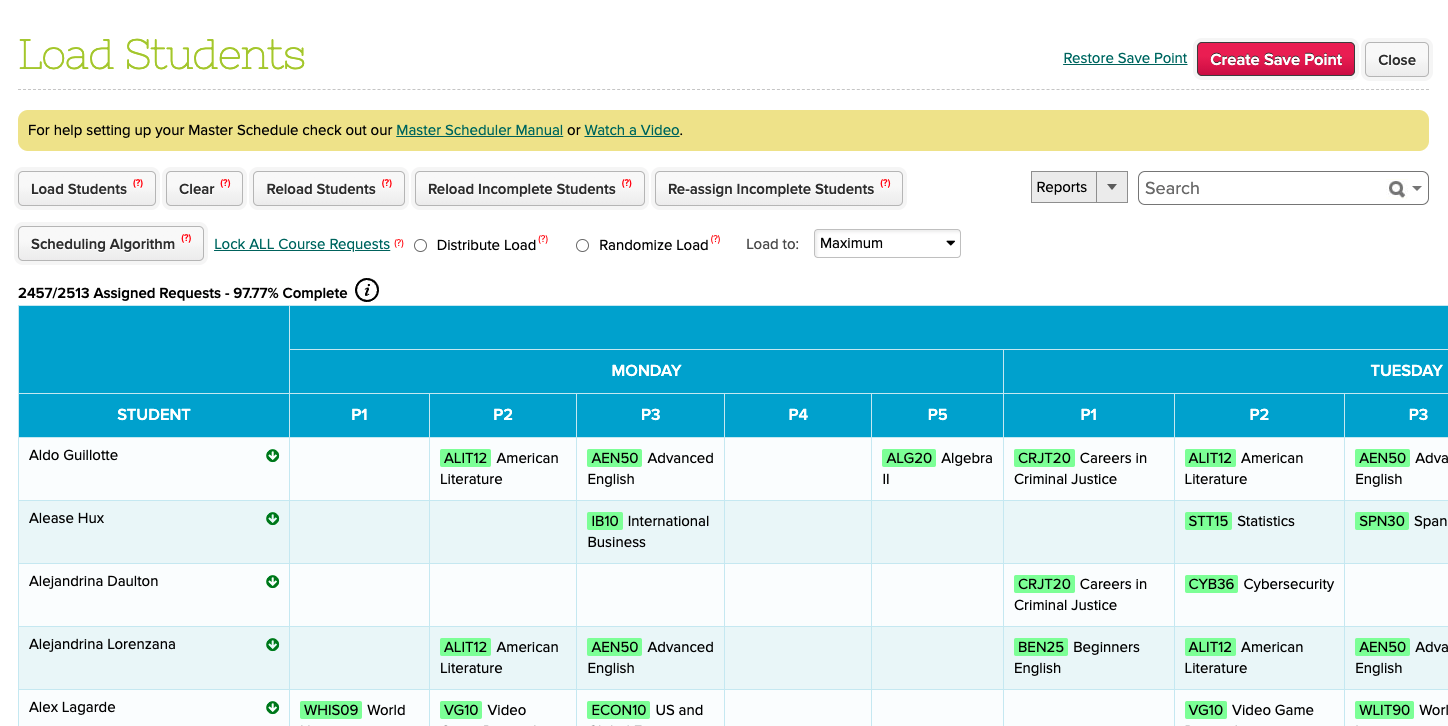
Master Scheduler Step 5 now has expanded headers for Academic Term and Day

Here is a list of the latest QuickSchools improvements:

Master Scheduler Improvements

  • Weekly Schedule now supports Scheduling Algorithms
  • Reinstate support for Optimize to Weekly Schedule
  • Fix Distribution Algorithm across all periods for Weekly Schedule
  • Show Semester and Days in Step 5
  • Bug fix when importing Course Requests without Teacher ID

Other Improvements

Read More »

FREE WEBINAR: Customizing Effective Report Cards with QuickSchools

We’re at that time of the year when teachers need to look back and list topics that were covered in each subject, as well as areas that could use improvements or enrichments. Yes, in other words – it’s report card season!

QuickSchools, as always, continues to support your school’s teaching, learning, and administrative needs. As part of our services, we’re offering a FREE webinar for school administrators on how to produce elegant report cards that will also provide essential feedback to students and their parents.

QuickSchools’ Customizing Effective Report Cards webinar is suitable for all levels of users. We’ll first provide an overview of the basic features in the Report Cards module, before covering more intermediate and advanced concepts. Key discussion points include:

  • Report Cards basics: linking sessions and courses, working with the Gradebook
  • Customizing the Report Cards template
  • Working with single term and multiple term Report Cards
  • Advanced Report Cards features: subject specific criteria, student-level criteria and standards

We hope that you’ll take advantage of our interactive webinar. Post questions and answer polls during the 30-minute presentation session, and discuss further details during the follow-up, 30-minute Q&A session.

This webinar is scheduled for Thursday, October 21st at 11 AM (PDT) / 2 PM (EDT). Log on to your QuickSchools account to register. You’ll see the announcement and sign-up link on the Teachers’ Lounge page.

* Business vector created by stories – www.freepik.com *

New Release – Oct 11, 2021

Here is a list of the latest QuickSchools improvements:

Online Forms App now displays email address for submissions

Master Scheduler Improvements

  • Copy Constraints from Step 3 for new Enrollment Periods
  • Copy Schedule from Step 4 for new Enrollment Periods
  • Support Optional Teacher for Course Requests
  • Fix Delete Student with Course Request
  • Import Teacher Caseload in Step 1
  • Bug Fix for Weekly Schedule when Frequency and Days is not configured in Step 1
  • Ability to bulk delete Course Request via Import in Step 2
  • Save Pagination Settings in Step 4
  • Ability to bulk delete Course Request by Import Date in Step 6
  • “External ID” and “Caseload” are now reportable in Report Creator

Online Form Improvements

  • Display Email Address in list of Online Form Submissions
  • Ability to search Online Form Submissions by Email Address
  • Disallow Applicants from creating multiple submissions with the same email address
  • Allow Applicants to retrieve forgotten Reference Number
  • Allow Administrators to upload Documents to Online Forms, regardless of Submission Status

General Improvements

  • Allow parents to enter “Notes” when paying online (Beta) – (See below)
  • Ability for teachers to configure default attendance (Beta) – (See below)
  • Retain Google Classroom Mappings when activating a new academic term
  • Ability to export transactions from Lunchroom App
  • Support Announcement by Subscription Plan
  • Fix Calculation of Totals in Lunch Ordering App for Parents
  • Fix Timezone Bug for Homeroom-based Attendance Notifications
  • Fix Disabling the Student Portal when the modules is disabled
  • Fix overlapping video tutorial on page footer
  • Bug fix for Custom PDF Templates
  • Bug Fix Report Cards for students who are unenrolled in the middle of the year
  • Restrict upload of certain file types
  • “Class ID” and “Has Graduated” are now reportable in Report Creator
  • New data definitions for Summary Reports
  • API Improvements for Temperature App on Mobile
  • API Improvements to Students Resources so support Pre-Enrollment
  • General Framework Improvements

Some highlights below:

Notes for Online Payments from Parents

When parents make payment online, we can enable a new “Notes for School” text field:

Read More »

5 Reasons Why You Need A Student Information System BEFORE You Open Your New School

5 reasons a new school needs a student information system

Are you planning to start your own school? Yes? Congratulations! Sharing your vision of education with the world is perhaps one of the most satisfying career choices you’ll ever make. It’s also a daunting undertaking. There are so many things to think about – funding, staffing, developing a curriculum, getting accreditations, etc.

One aspect that you shouldn’t overlook is the need to acquire a Student Information System (SIS) BEFORE you open the (virtual) doors to your new school. An SIS will help you automate tasks, simplify work processes, and improve communications. Invest in the time to choose an SIS now, and you’ll reap the benefits of a reduced workload – not just during this critical, initial stage, but also for the long term.

Here we list out the top 5 reasons why acquiring an SIS BEFORE you open your new school is a must:

Read More »

Thanks For Making Our September 2021 Webinar A Success!

Thanks to everyone who attended the webinar on Mastering the Gradebook with QuickSchools. This was our most successful webinar to date!

Webinar presenter – Azroy Kandan – explaining how teachers can use our Gradebook module to its fullest.

We sent a follow-up email to all registrants. We appreciate it if you could provide us with feedback so we can make the next webinar even better. Also, in case you missed joining the session or would simply like a copy of the recording, please let us know by filling in the survey included in the follow-up email. Our team will send you a link to the recording once it’s available.

We’re already preparing for our next webinar, which will focus on Report Cards. Keep an eye out for a detailed announcement in early October. We look forward to hosting you. Till then, stay safe!

New Release – Sept 20, 2021

Here is a list of the latest QuickSchools improvements:

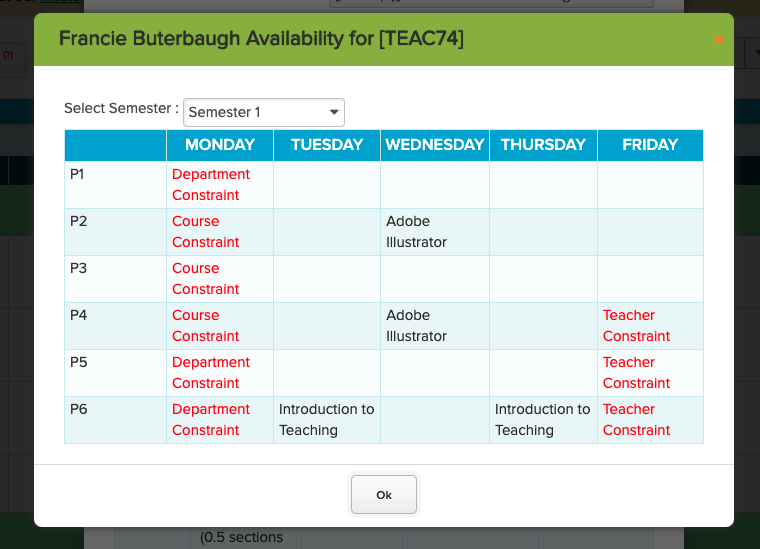
View Teacher Availability for a Specific Course when reviewing Sections in Step 4

Master Scheduler Improvements

  • Support Caseload Limit in Step 1: “Configure Teachers” (See below)
  • Bug Fix Weekly Schedule when “Days” is left blank in Step 1: “Configure Courses”
  • Ability to adjust target from Step 2: “Course Requests by Course”
  • Bug Fix calculation of Number of Sections in Step 2: “Course Requests by Course”
  • Show Teacher Availability in Step 4: “Schedule”
  • Display total when showing Breakdown by Department in Step 5: “Load Students”
  • Cosmetic improvements to Step 5: “Load Students”
  • Bulk Send Section PDF in Step 6
  • General refinements to the Weekly Schedule feature
  • Bug fix remove course requests when students are deleted in bulk

General Improvements

  • Ability to customize general PDF templates (Private Beta)
  • Ability to customize general email templates (Private Beta)
  • Improve Semester Activation function to include the following options (See below):
    • Do not copy subject
    • Copy subject without teachers
    • Copy subject without student enrollments
  • Migrate Subject Custom Fields when activating a new semester (See below)
  • Support Custom Fields when importing Subjects
  • Support Read-Only access to general Report Cards for non-administrators
  • Support multiple active Report Cards when submitting grades from Gradebook
  • Support separate First and Last name for Submitter in Online Forms (See below)
  • General Improvements and API Support for the Temperature App
  • Bug Fix Class Discussions dropdown filter for Semester
  • Bug Fix BCC when sending Email Templates from the Admissions module
  • Bug Fix “All Not-Yet-Taken” setting for Attendance Notification Dashboard (Private Beta)
  • Minor Bug Fix for Daily Period Zero Attendance
  • Server Security Updates

Some highlights below:

Read More »

FREE WEBINAR: Mastering the Gradebook

Classes are underway. Things are (finally) settling down…

First and foremost, if you’re a part of the QuickSchools community, we’d like to thank you for your trust in us. We’re honored to be given the opportunity to partner with you.

Teaching is hard, and we like to think of ways to help out as best we can. As part of this effort, we’re continuing with our monthly webinar series. The September webinar will focus on the Gradebook module. We’ll show you how to leverage the Gradebook so you can easily monitor student progress and provide optimal feedback.

QuickSchools’ Mastering the Gradebook webinar was developed with teachers in mind. It is suitable for all levels of users. We’ll go through a brief overview of basic Gradebook activities, before moving on to intermediate and advanced topics. Key discussion points include:

  • Gradebook basics: adding columns and formulas, and grading (re-normalizing and weighted grades)
  • Configuring the Gradebook settings: icons and optional tools
  • Communicating with students and parents: sharing feedback, and private vs public comments
  • Transferring grades from the Gradebook to the Report Cards
  • Alternative grading: Standards-based and Self-paced

This webinar is interactive. Post questions and answer polls during the 30-minute presentation session, and discuss topic further during the follow-up, 30-minute Q&A session.

QuickSchools’ Mastering the Gradebook webinar is scheduled for Thursday, September 23rd at 11 AM (PDT) / 2 PM (EDT). Register by logging onto your QuickSchools account. You’ll see the registration link on the Teachers’ Lounge page.

See you there!