Quickschools offers a new way to take attendance! Seating arrangement allows teachers to easily spot who’s absent in the class – and makes taking of attendance way easier. Having said so, we are introducing a new app called Homeroom Attendance Seating Chart. Teachers can then easily mark absent students in a single glance. No need for a roll call!
This feature currently supports Homeroom Attendance.
If you want to use this feature, simply download our app via APP STORE. For instruction on how to install and set this up, please check out our Support Site article: Homeroom Attendance Seating Chart
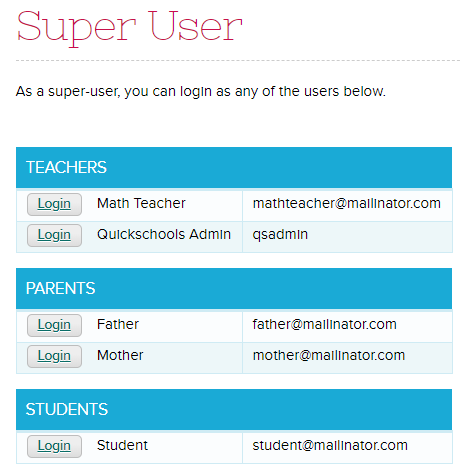
To help school administrators manage user accounts for their schools, Quickschools launched a new Super User app. This was included in Sprint D12 release. The app can be installed from the Quickschools App Store.
As a Super User you will have access to the list of all users on your school – Teachers, Parents and Students. By clicking the ‘Login’ button beside the user’s name, the Super User will be able to log into the account, for purposes of debugging and verifying user access and privileges.
Please check out our support article for more information and let us know if you have comments or suggestions!
It’s been several years since we first launched our App Store. Since then, QuickSchools has released several new apps, and we anticipate several more in the coming months. Please check these new apps out at the QuickSchools App Store. And if you don’t have access to the App Store, but you’re interested in some of these apps, be sure to let your administrator know.
New Apps for Sept 2018
Recently Released New Apps
Super User – Allow Administrators to login as any user in your school.
Homeroom-Based Seating Charts – Allow your homeroom / class teachers to create a seating chart, and take attendance by seating chart.
Sports and After School Activities – Track students taking sports and after school activities.
Health – Track medical history for students, include medication and doses taken.
Master Scheduler (Beta) – Full featured Master Scheduler based on Course Requests and Course Offering.
Recently Updated Apps
Custom Domain – Use a custom domain for your QuickSchools account, so that your users can easily remember how to access QuickSchools.
Schoology (LMS) Gradebook Integration – Export / Synchronize your roster from QuickSchools to Schoology, and pull Gradebook data from Schoology in order to create Report Cards and Transcripts in QuickSchools.
Canvas (LMS) Gradebook Integration – Export / Synchronize your roster from QuickSchools to Canvas, and pull Gradebook data from Schoology in order to create Report Cards and Transcripts in QuickSchools.
Our new QuickSchools Sports and After-School Activities Tracker App combines the Sports Tracking and After School Activities modules from the Athena plan. This app allows you to keep track of activities and sports offered at your school. It’s super simple, quick to setup, and easy to use!
Once you have installed the app you will be able to add activities and sports, both work the same way. When adding an activity you will need to specify the activity name, teacher who oversees the activity and the max number of members allowed to participate:
Once an activity has been added, you’ll then be able to add students who are participating:
For more details on how to set this up see our support article. Do try it out, and let us know if you have comments or suggestions!
Using the Online Forms in QuickSchools, you can collect fees from parents or students. There are 2 options when collecting fees:
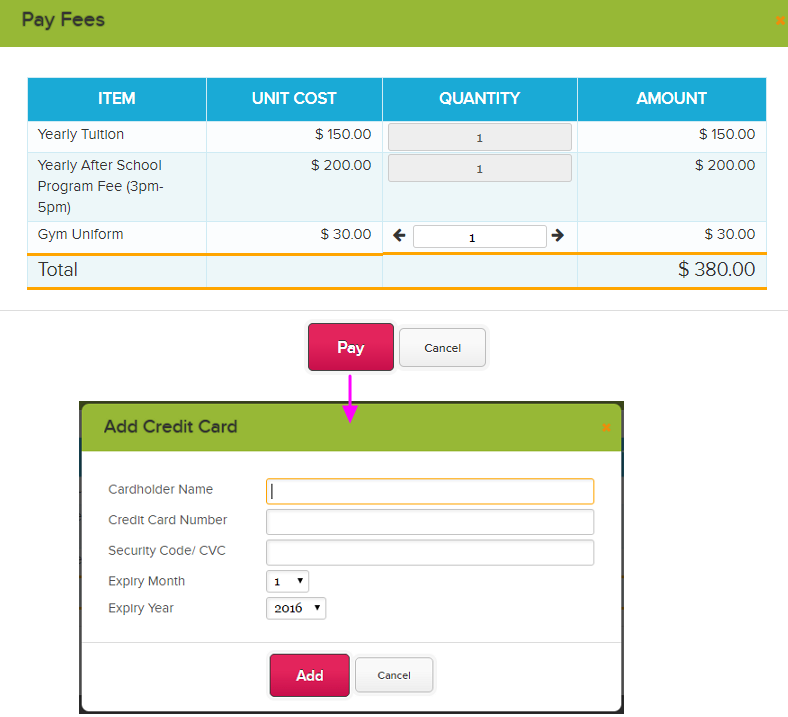
Immediate payment: pay using Credit Card upon completing the online form
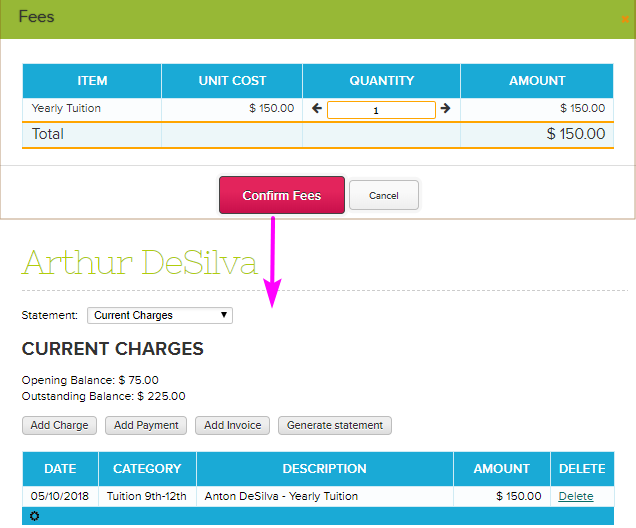
Charge to account: students will be charged via Fee Tracking upon completing the online form
Immediate Payment
This option will collect payment before the parent/student can submit the form. You’ll need to set up the fees that need to be paid – and these fees will be shown to parents/students on the last step, right before completing the online form. Note: Stripe should be set up on your account for this to work
As you can see above, the parent/student needs to enter his/her credit card information to make payment, in order to complete the form submission. You can use this option for selling tickets to events (like an End-Of-Term Concert), or for products like T-Shirts and books.
The Online Forms module can be made accessible to the public, so you don’t have to be a QuickSchools users in order to submit (and pay for) forms. For more information on this method, click here.
Charge to Account
For this option, you’ll also need set up the fees to be paid. The parent/student will just need to confirm these fees before completing the form. The fee will be added to the student’s account under Fee Tracking as a charge and parents/students can make payment at a later time:
Since the fee will be charged to the students, this method is only applicable to students that already exist in the system.
For information in setting up this method, click here.
Please chat with us if you have questions. We’d be glad to help!
Quickschools allows schools to roll out application or enrollment forms to parents and students via online forms. These application forms can then be used to seamlessly enroll the students in the system – getting rid of the arduous manual entering of student information from hundreds of application forms.
Quickschools supports two online forms – one is via the Admissions module while the other one is via the Online Forms app. These are the similarities between the two modules:
Both handle the enrollment of new students, including inquiries
Both have an Online Forms component, for collecting data submitted online (from a public page)
Both support Email Templates, to correspond with inquiries and applicants
Both allow applicants to upload files
One thing to note is that the Admissions module is included in all subscription plans within QuickSchools, vs. Online Forms is a paid app. Having said so, the Admissions module is designed with simplicity in mind, so schools can make use of it quickly. The Online Forms on the other hand are designed with more robust functionality.
The table below shows the difference between the two:
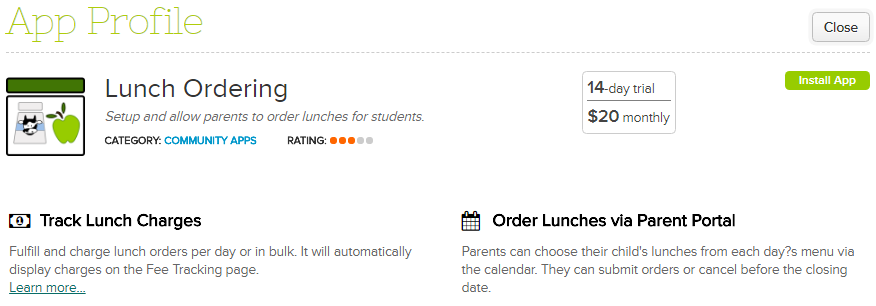
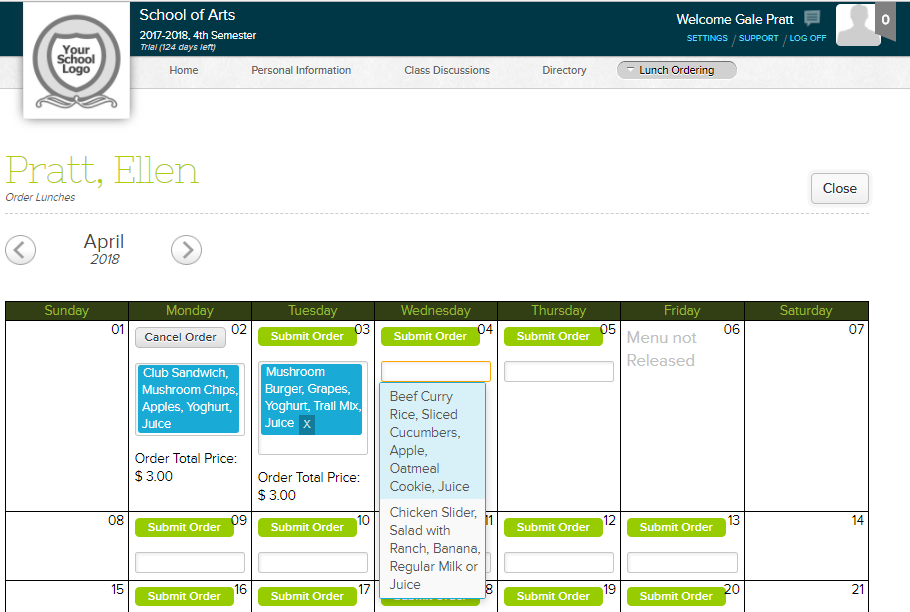
QuickSchools is proud to announce our new Lunch Ordering app, now available in our App Store. Parents can now easily order student lunches online via the Parent Portal.
Administrators for the app will have full flexibility in setting up meal items, meal prices, along with a daily menu. Parents and students can then select items available from the menu for any given day. The screenshot below shows how Lunch Ordering looks like in Parent Portal:
Lunch Ordering integrates with Fee Tracking for streamlined charging of students. So parents can view charges for their lunch orders via Fee Tracking, and they can also make payments through this module.
For more info about Lunch Ordering, please see our support article here.
We’d love to hear from you. Please chat with us if you have questions!
QuickSchools is delighted to announce a new addition to our App Store… the Health App:
With the new Health App, there’s a new “Health” tab on the student record with more robust capabilities for tracking student medical information, including medical history, medication, notes and testing. For more information, check out our support article below: