Back-to-school season is here, and for school admins, it’s full throttle from day one. It’s the busiest time of year, and your Student Information System (SIS) should be working just as hard as you are. However, some users only use a fraction of what their SIS is capable of. With these underutilized tools (which we highly recommend), you should be able to eliminate manual work and reduce errors. These tools save you hours and eliminate busywork. In this post, we’re spotlighting five commonly overlooked SIS capabilities that could dramatically lighten your administrative team’s workload.
Read More »Category: Features and Benefits
Your Guide to Creating High-Quality Transcripts — Join Our Webinar
As schools prepare transcripts for graduation and post-secondary admissions, we invite you to our final webinar of 2025: Creating High-Quality Transcripts. This session will guide you step by step through the QuickSchools Transcripts module. Whether you’re just getting started or already experienced, we’ll cover the essentials and build toward advanced features — so you can confidently manage transcripts.
Read More »Join Our Webinar: Keeping You Safe with Security Best Practices
With the 2025–2026 school year in full swing, we want to help you focus on what matters most—your school community—without worrying about security risks.
That’s why we’re inviting you to join our free webinar on Keeping You Safe: Security Best Practices for the QuickSchools Community. Together, we’ll explore simple, practical ways to protect your account, keep your data secure, and stay ahead of cyber threats when using QuickSchools.
👉 Join us on Thursday, September 18, at 11 AM PT / 2 PM ET.
Read More »August 2025 Webinars for Teachers & School Administrators
August webinars are approaching. We’re excited to bring you two live sessions. In this post, you’ll find all the details you need to mark your calendars and take advantage of this opportunity to simplify your work. Don’t miss out!
Read More »Two-Factor Authentication (2FA) for Super User
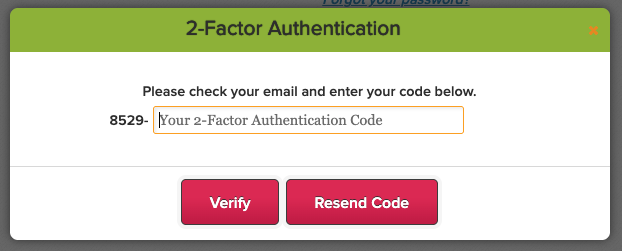
We’ve just released a new improvement to enforce two-factor authentication (2FA) for the Super User App. So when using the Super User app to log into QuickSchools as a different user, you will be prompted for a verification code:
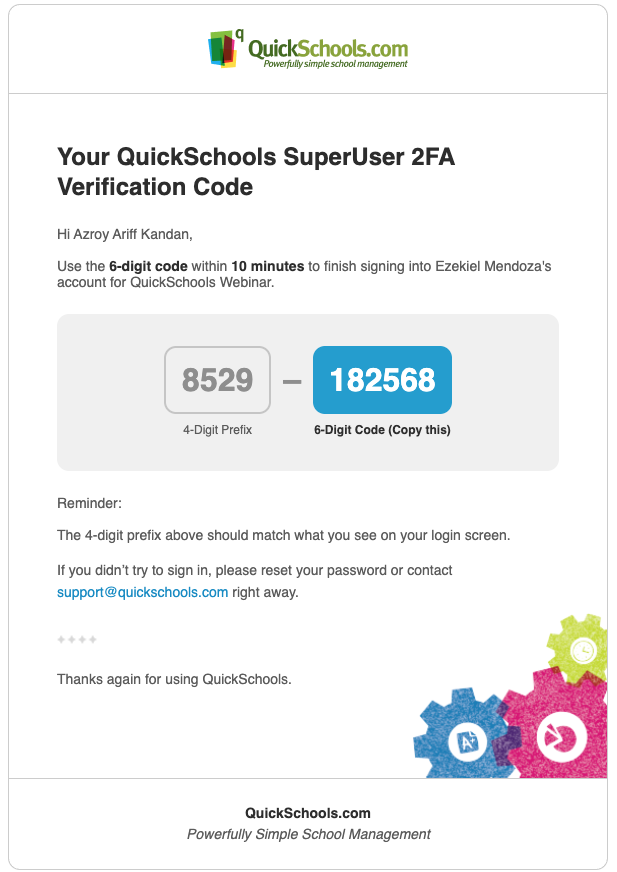
The verification code will be sent to email or Google Authenticator, per your 2FA Settings:
Please chat in with questions or support.
New Release – Mar 20, 2025
This QuickSchools release focuses on security features and our new UI for Orchestra Master Scheduler, along with miscellaneous improvements and bug fixes.
Full list of improvements are below:
Security Improvements
- Show Active Sessions – See below
- Login History (for School Admin) – See below
General Improvements / Bug Fixes
- Improve Required Custom Fields for Students
- Improve Report Creator for Report Card data
- Improve Student Navigator
- Improve Mass Messaging Browser Support for Safari (version 16 and prior)
- Bug Fix Standard Charges
- Bug Fix Gradebook when moving columns
- Bug Fix Gradebook PDF error due to deleted Category
Beta / System Improvements
- New UI for Orchestra Master Scheduler (Beta) – See below
- PDF Template App support for Lunch Roster
- Notes Field for Data Monitor (Internal)
- Notes Field for Group School (Internal)
Active Sessions
User can now view all active sessions, and log out from those devices remotely:
Login History (for School Admin)
School Administrators can now view the Login History for teachers, students and parents. Just look for the “Login History” button/link on the corresponding record:
Read More »Security Update – Mar 12, 2025
We’ve just released an update to our two-factor authentication (2FA) framework, standardizing the 2FA expiry to 10 days for ALL users, including School Administrators. The 2FA expiration is device-specific, meaning once you log in on a device, you won’t need to enter a new 2FA code for the next 10 days—unless you clear your cache or switch to a different device.
Thank you for your patience and support as we continue to improve our platform.
Upcoming Improvements
We have some additional security improvements that we’re excited to roll out in our next QuickSchools release. You can look forward to:
- Users can view Active Sessions and terminate them
- Admin Users can view Login History for Teachers, Students, and Parents.
Also coming soon:
- Verification Code when purchasing Utility Credits
- 2FA for Super User
- Captcha on Login
We’re committed to improving the user experience while maintaining the highest security standards. Please continue to share your experience on QuickSchools with our Support Team, via Chat or Email.
Protecting Your QuickSchools Account: What You Need to Know About Two-Factor Authentication (2FA)
Update (New Date: February 24, 2025)
The rollout date for mandatory Two-Factor Authentication (2FA) has been rescheduled from February 17 to February 24. This blog post has been updated to reflect the change. Please review the details below to ensure a smooth transition.
At QuickSchools, your security is our top priority. That’s why we’re rolling out Two-Factor Authentication (2FA)—an extra layer of protection to ensure that only you can access your account.
We understand that changes like this may bring up questions, so we’ve put together a helpful guide to walk you through the upcoming 2FA rollout:
- What is 2FA?
- Why should you enable 2FA?
- How do you enable 2FA on your account?
- Can you turn off 2FA on your account?
- What if you don’t have an email address?
- Need help?
Stay protected and up to date–learn more about 2FA today!
Read More »