This QuickSchools release contains a few major improvements to our internal systems / framework, along with a few bug fixes. We will continue to focus more on system stability, performance and maintenance through the end of the year:

Full list of improvements are below:
General Improvements
- Update Email History for Online Forms
- Miscellaneous Bug Fixes for Online Forms
- Bug Fix Override Period Names for Subject Attendance
- Bug Fix Bulk Fill Option in Subject-Based screen for Report Cards
- Expand Support for Read-Only Gradebook
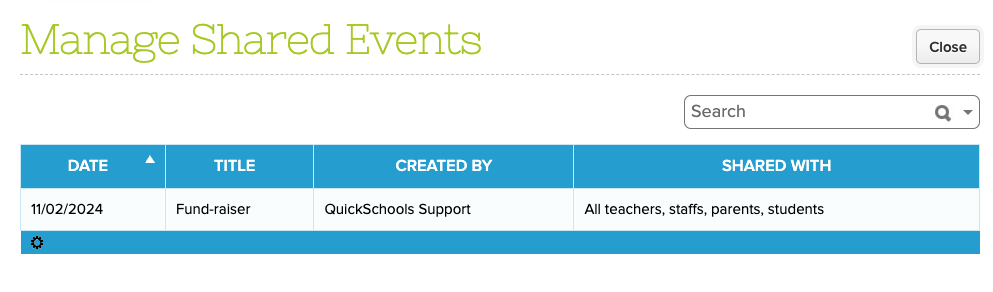
- Expand Support for managing Shared Events on Teachers Lounge (See below)
- Expand Support for customizing generated PDF for Simplified Schedule
- Expand Next Course Algorithm for Single-Semester Schedules on Orchestra
Improvements to “Courses & Sections”
- Expand support for “Excluded from Grading”
- Support for Override Room for specific periods in a Section
- Improve Semester Activation process
Improvements to Chronos Transcripts
- New feature to reallocate earned credits to another subject area
- Improve how Institutions are sorted
- Improve how “Credits Waived” is displayed
- Improve how Grades are transferred from Gradebook
- Miscellaneous Improvements to Graduation Tracks
Beta / System Improvements
- Reduce system errors
- Improve Email Address Validation
- Improve Data Monitor Framework
- Improve Data Maintenance mechanisms
- Improve UI for Scheduled Emails via Report Creator
- Miscellaneous UI Improvements to Payment Plan
- Miscellaneous Improvements to Email History Framework
- Miscellaneous Improvements to SFTP Sync App
- Miscellaneous Improvements to internal management systems
- Miscellaneous API Improvements for Mobile
Sharing Events on The Teacher Lounge
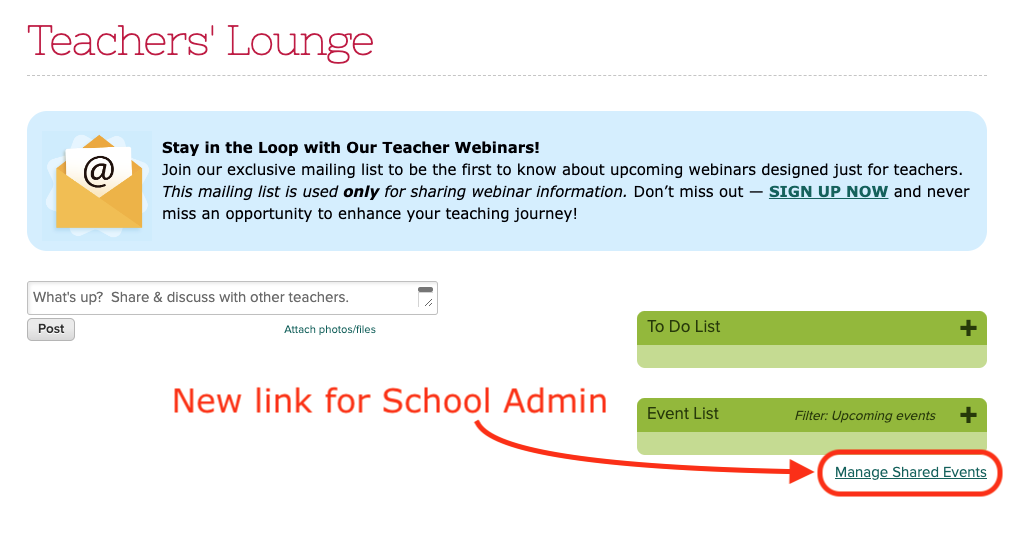
On the Teachers Lounge, administrators will now see a new “Manage Shared Events” link, which allows admins to manage events that have been shared with other users:
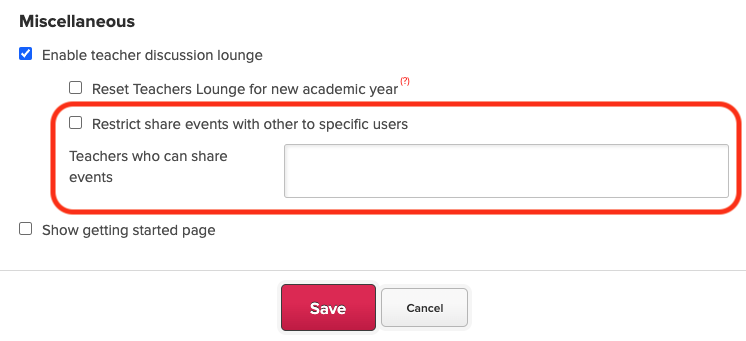
Also, administrators can use the “Edit Overall Settings” to restrict users from sharing events:
For shared events, admins can view and update them as necessary: