New Release – July 9, 2025

This QuickSchools release focuses on improvements to the Online Forms App as well as the Library App, along with general improvements to our Student Information System (SIS) and new UI for the Orchestra Master Scheduler. 
Full list of improvements are below:

Online Forms App

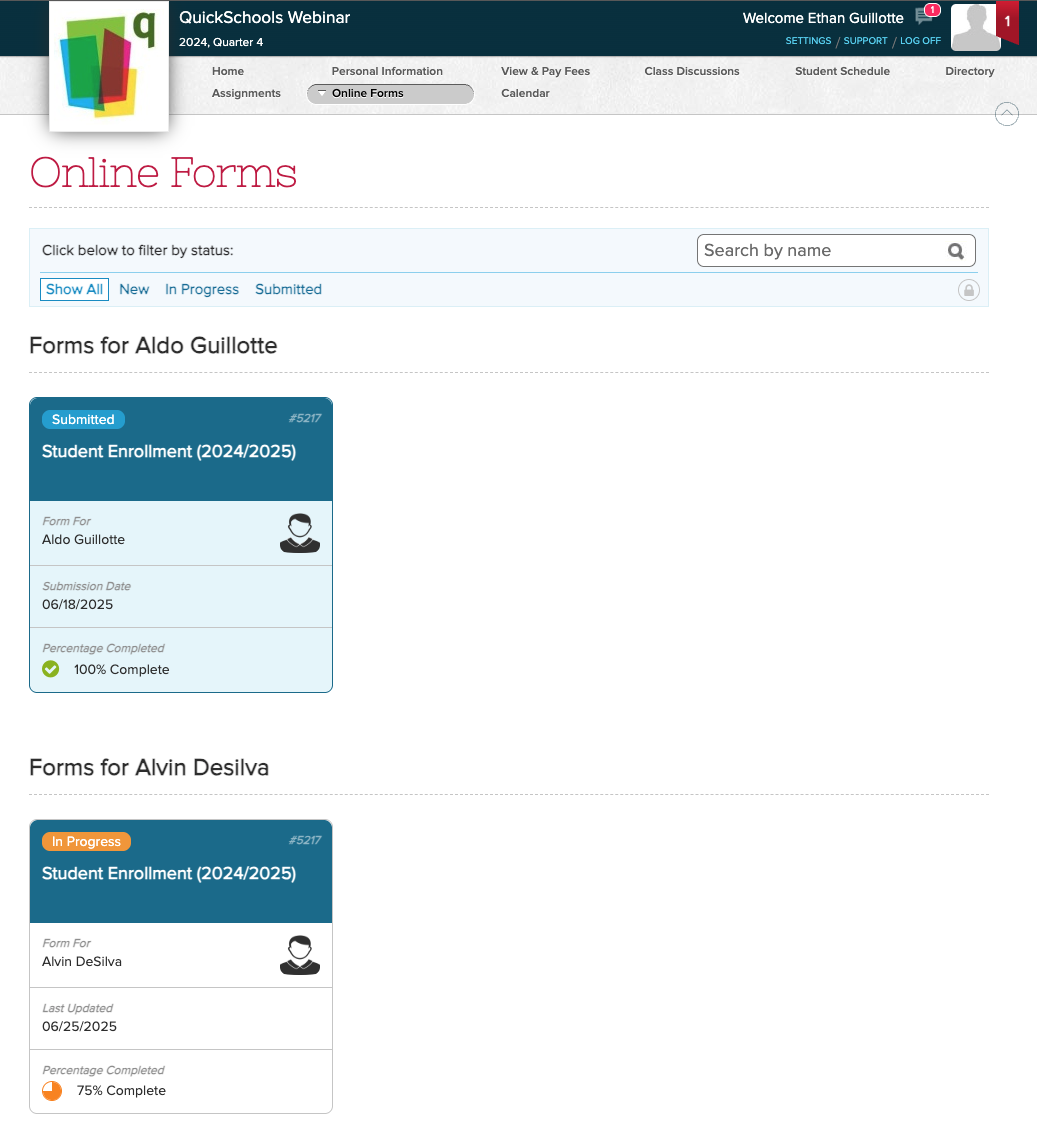
  • New “My Submissions” menu (See above) – BETA

Library App Improvements

  • Support Custom Book Status (See below)
  • Improve how ISBN can be scanned
  • Improve support for deleted books
  • Miscellaneous Cosmetic UI Improvements
  • Bug Fix display borrower when student is deleted

General Improvements / Bug Fixes

  • Improve how Primary Payers are assigned (See below)
  • Ability to Search and Sort Email Messaging History
  • Support for Fixed Starting Period for courses in Orchestra Master Scheduler
  • Miscellaneous UI Improvements to Orchestra Master Scheduler (NEO)
  • Miscellaneous UI Improvements to My WorkSpace (Learn)
  • Improve Custom Calculation (Java Snippet) Support for Report Cards
  • Improve Payment Flow for Online Form Submissions
  • Improve Support for Deleted/Inactive Stripe connection
  • Improve Support for Two-Factor Authentication (2FA)
  • Bug Fix Admissions for new Trial Accounts

Custom Book Status for Library App

The Library App has been in our App Store for quite some time now. And now that we’ve built a stronger customer base, we’re making the module more robust. 

One of the key improvements here is the ability to create your own custom Book Status. This setting is available under “Library” > “Configure”:

Read More »
New Release – June 17, 2025

This QuickSchools release focuses on improvements to the Online Forms App as well as the new UI for the Orchestra Master Scheduler. 

Full list of improvements are below:

Online Forms App

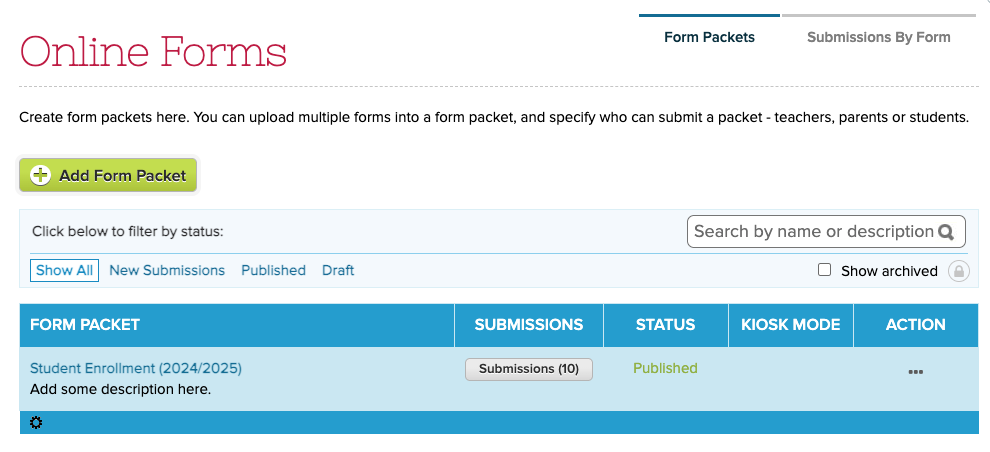
  • New UI for Form Packets Listing (See above)
  • Refine “Submissions by Form” screen
  • New Search function for Form Packets
  • Payment Instructions now supports Rich Text
  • Email History for Auto-Email on Status Change
  • Improve how Custom Fields are displayed in Submissions Listing
  • Improve Search Submissions by Custom Fields
  • Option to upload files via Custom Fields and make them mandatory (See below)

Courses & Sections

  • Improve Semester Activation
  • Improve Support for Term Grades in Gradebook

General Improvements / Bug Fixes

  • Improve Support for Transcripts in Summary Reports
  • Improve new UI for Orchestra Master Scheduler
  • Text Messaging for Applicants (Beta)
  • Bug Fix Teacher Directory on Parent Portal for Students not linked to Homeroom or Subject
  • Bug fix “Add missing students” for Section Attendance

Custom Field for File Upload

We have introduced a new Custom Field type called “File Upload”. And in some modules, like the Online Forms, you can make the field “Required”:

Read More »

New Release – May 21, 2025

This QuickSchools release focuses on improvements to the Online Forms App, Security as well as the new UI for the Orchestra Master Scheduler. The full list of improvements is below:

Online Forms App

  • Improve Auto-Email and Email Notification on Status Change
  • Improve Report Creator support for Submission Payments
  • Improve Payment Flow
  • Include Fee Structure when “Copy & Archive” Form Packet
  • Show Submission Payment Details in Bulk Processor
  • Bug Fix Duplicate record in Submissions list

Security Improvements

  • Improve IP Blocking
  • Minor improvements to login Captcha (Beta)
  • Bug Fix 2FA for Group School

General Improvements / Bug Fixes

  • Improve Performance for Report Creator
  • Improve the new UI for Orchestra Master Scheduler

We have some additional improvements to Group School coming soon.

New Release – May 7, 2025

It’s been a while since our last QuickSchools release. We continue to focus on security and our new UI for Orchestra Master Scheduler (from last month), along with miscellaneous improvements and bug fixes. 

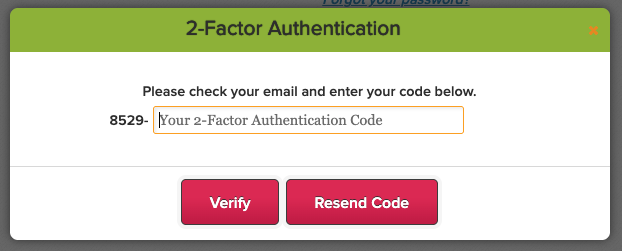
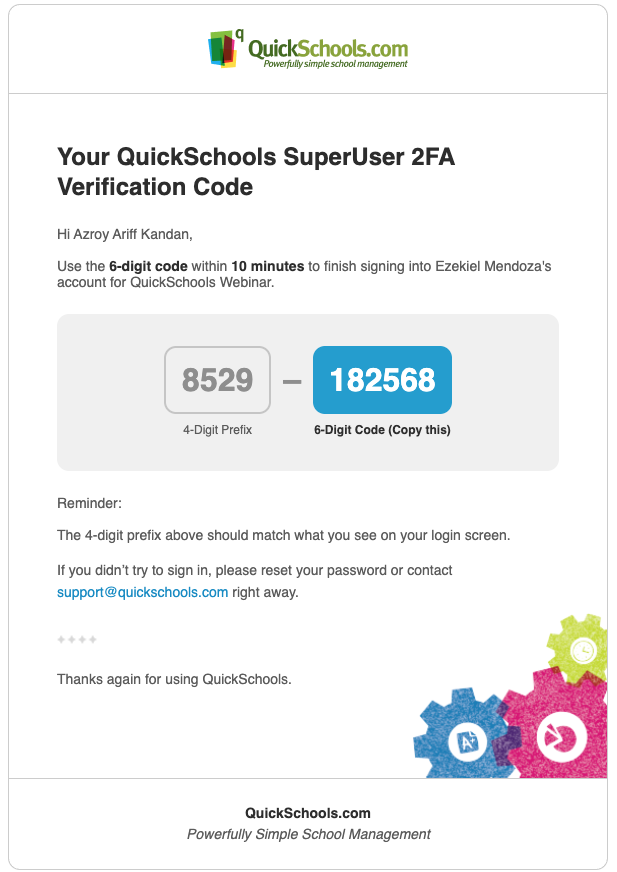
Two-Factor Authentication (2FA) Code has a new 4-digit Prefix

Full list of improvements are below:

Security Improvements

  • Ability for School Admin to disable 2FA for all Students and all Parents (See below)
  • Enhance the Change Password functionality (Expire Session, Email Notification)
  • Improve “Login from new Device” Email
  • Miscellaneous Fixes for Google Authenticator
  • Miscellaneous Improvements to 2FA (2FA Prefix – See above)
  • Verification Code for purchasing Utility Credits and Change Password (Beta)
  • Captcha on Login (Beta)

General Improvements / Bug Fixes

  • Ability to disconnect Canvas Integration
  • Improve Listing of Users from Canvas
  • Improve Schoology Auto-Enrollment of Students
  • Improve Clever SFTP App
  • Improve ability to connect/reconnect with Stripe
  • Separate Attendance Roster based on Subject Abbreviation
  • Bug Fix Auto-Fill for Online Forms
  • Bug Fix Print Student Profile
  • Bug Fix Teacher Directory for Student/Parent Portals
  • Bug Fix “Add Missing Students” for Section Attendance
  • Bug Fix removal of GPA values in Transcripts
  • Bug Fix clear Admin Column for Report Cards

Beta / System Improvements

  • Sign-In/Sign-Out App for Teachers
  • Custom Ability to edit uploaded Student Documents
  • Improve Attendance Dashboard
  • Improve Course Importer (depends on District Settings)
  • Improve Semester Activation with Courses & Sections
  • Improvements for new Master Scheduler UI
  • Improvements to Email Framework
  • Transfer Grades for Chronos Transcripts for Inactive Students 
  • Exclude “Excluded from Grading” from Graduation Status Report

Disable 2FA for Students and Parent

School Administrators now have the option to completely disable two-factor authentication (2FA) for all Students and Parents:

Read More »

New UI for Orchestra Master Scheduler

QuickSchools is proud to announce the release of a new UI for the Orchestra Master Scheduler (currently in Beta). This is just a front end change, so you can freely switch between the new UI and the original UI, in case you prefer one version over the other:

Here’s a quick run down:

Streamlined Main Page

The main page is now organized into 7 clear steps, making navigation easier. Key tools like Teacher Scheduler and Load Students are front and center, while less-used modules are neatly tucked away for quick access.

Read More »

New Release – Mar 20, 2025

This QuickSchools release focuses on security features and our new UI for Orchestra Master Scheduler, along with miscellaneous improvements and bug fixes. 

School Admin can view Login History for all users

Full list of improvements are below:

Security Improvements

  • Show Active Sessions – See below
  • Login History (for School Admin) – See below

General Improvements / Bug Fixes

  • Improve Required Custom Fields for Students
  • Improve Report Creator for Report Card data
  • Improve Student Navigator
  • Improve Mass Messaging Browser Support for Safari (version 16 and prior)
  • Bug Fix Standard Charges
  • Bug Fix Gradebook when moving columns
  • Bug Fix Gradebook PDF error due to deleted Category

Beta / System Improvements

  • New UI for Orchestra Master Scheduler (Beta) – See below
  • PDF Template App support for Lunch Roster
  • Notes Field for Data Monitor (Internal)
  • Notes Field for Group School (Internal)

Active Sessions

User can now view all active sessions, and log out from those devices remotely:

Users can view their “Active Sessions” and log them out

Login History (for School Admin)

School Administrators can now view the Login History for teachers, students and parents. Just look for the “Login History” button/link on the corresponding record:

Read More »

Security Update – Mar 12, 2025

We’ve just released an update to our two-factor authentication (2FA) framework, standardizing the 2FA expiry to 10 days for ALL users, including School Administrators. The 2FA expiration is device-specific, meaning once you log in on a device, you won’t need to enter a new 2FA code for the next 10 days—unless you clear your cache or switch to a different device.

Thank you for your patience and support as we continue to improve our platform.

Upcoming Improvements

We have some additional security improvements that we’re excited to roll out in our next QuickSchools release. You can look forward to:

  • Users can view Active Sessions and terminate them
  • Admin Users can view Login History for Teachers, Students, and Parents.

Also coming soon:

  • Verification Code when purchasing Utility Credits
  • 2FA for Super User
  • Captcha on Login

We’re committed to improving the user experience while maintaining the highest security standards. Please continue to share your experience on QuickSchools with our Support Team, via Chat or Email.